Overview
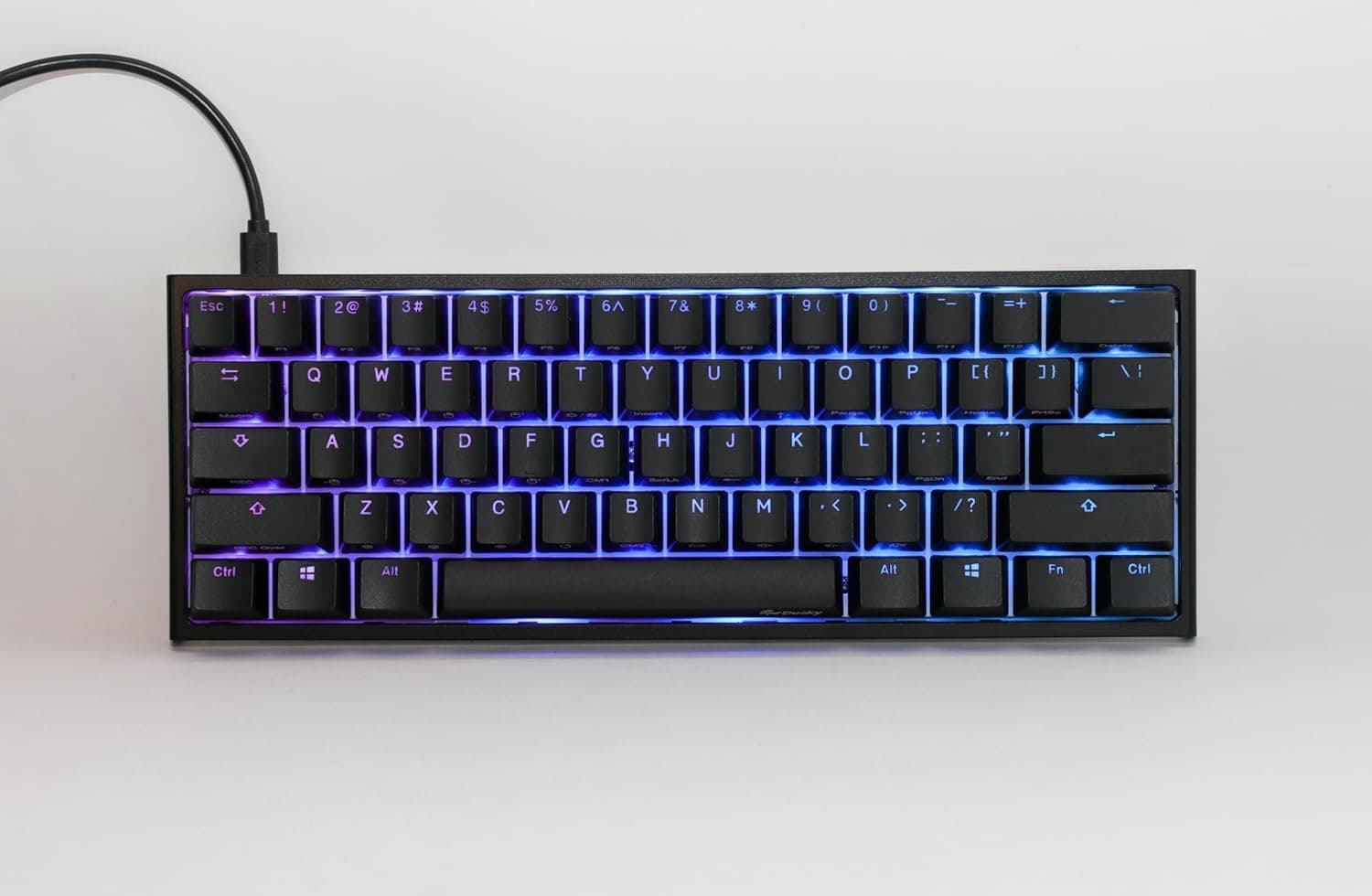
The Ducky One 2 Pro Mini is a 60% mechanical keyboard — no numpad, no arrow cluster, no function row. It is the compact member of Ducky's One 2 line, aimed at gamers who want maximum mouse room and at anyone trying to reclaim desk space.
On Amazon.co.jp it holds 4.4/5 across 34 reviews (88% positive, captured 3 June 2026): a solid score, though the sample is small.
The short version: this board suits people who swing the mouse a lot and can accept learning an Fn layer. If your day involves heavy numeric entry, spreadsheets, or timeline editing, a 60% layout will fight you.
Buying it on looks and footprint alone is the most common way people end up disappointed.
What a 60% Layout Actually Removes
Compared with a full-size board, a 60% drops the numpad, the navigation block (Insert / Delete / Home / End / PgUp / PgDn), the F1–F12 row, the arrow keys, and Print Screen. Roughly 61 keys remain, and the board is about a third narrower.
Those keys are not gone — they move to an Fn layer. Typical 60% assignments put arrows on Fn + I/J/K/L or the right-hand symbol cluster, F-keys on Fn + the number row, and Delete on Fn + Backspace.
Legends and mappings vary by revision, so check the bundled manual or Ducky's official product page once the board arrives.
The real cost is that combos become two-stage. Alt + F4, Shift + arrow selection, or Ctrl + Home turn into three- and four-key presses, and some one-handed shortcuts now need both hands.
This is where opinions on 60% boards split.
| Use case | Fit with 60% | Why |
|---|---|---|
| FPS / MOBA gaming | Good | More mouse room; the keys you use sit on the left |
| Programming | Conditional | F5/F12 debugging and Home/End must be relearned on the Fn layer |
| Spreadsheets / accounting | Poor | Missing numpad and arrows hit directly |
| Video / photo editing | Poor | Shortcuts cluster on the F row and arrows |
| Travel / secondary machine | Very good | Narrow enough to slide into a bag |
Treat the table as a tendency, not a verdict. Many owners keep a 60% for gaming and a separate board for work; expecting one board to cover everything is where friction starts.
Compatibility Guide
Connection is wired USB, and compact One 2 models generally use a detachable USB Type-C cable on the board side. A detachable cable means a frayed cord does not cost you the keyboard, and it packs smaller.
Layout (US or JIS) and cable spec differ by sales variant, so confirm the legends in the product images before ordering.
As a USB HID device it types on Windows, macOS, and Linux without drivers. The catch is that many of these boards ship in US ANSI layout.
On Windows you must switch the input layout to English, or symbols such as @ and : will not match the legends; on macOS, select the ABC/US input source.
Ducky has traditionally favoured onboard configuration rather than a resident driver application — lighting modes, macros, and profiles handled on the keyboard itself. That is a genuine advantage if you move between machines or dislike background software, and a learning curve if you prefer a GUI.
Feature sets differ by model, so verify the specifics for your exact model on Ducky's official product page.
Switches are the other variable. Ducky boards are commonly sold in several switch options: linear (smooth), tactile (a bump mid-travel), and clicky (audibly loud).
Feel and noise differ completely between them. If you share a room or talk on voice chat, avoid the clicky variants, and always confirm the switch name in the listing's variation selector.
Product Info
rmation
On Amazon.co.jp the board was listed at ¥17,210 as of 3 June 2026.
That places it mid-to-upper tier for a 60% mechanical — a different league from the sub-¥5,000 shelf. Keyboard prices move with exchange rates and sales, so check the live listing before you buy.
Reviews sit at 34 with a 4.4/5 average (88% positive, captured 3 June 2026).
Thirty-four is a thin sample: one or two outliers shift the mean. Read the negative reviews for substance — a dead-on-arrival unit is a manufacturing lottery, while "the layout didn't work for me" is the product working as designed.
Those two mean very different things for you.
An eBay US listing shows $31.99, which does not reconcile with the ¥17,210 figure.
A branded 60% mechanical board does not realistically trade around ¥3,000, so that entry is most likely a keycap set, a cable, or a different product entirely. This article does not treat it as the product price.
If you shop overseas marketplaces, confirm from the photos and description that you are buying the keyboard itself.
What Matters in Daily Use
Satisfaction with a 60% board is decided by the first two weeks, not by the spec sheet. Most people find the missing arrows genuinely irritating for a few days, internalise the Fn layer within one to two weeks, and stop noticing after that.
Judge it after seven days and you never reach the good part — so switch during a calm stretch, not the week of a deadline.
The desk-space effect is bigger than the numbers suggest. Losing a third of the width lets you fit a larger mousepad on the same desk, which matters most to low-sensitivity FPS players.
Keyboard and mouse also sit closer together, which reduces shoulder splay over long sessions.
Typing noise depends on the mounting surface as much as the switch. A hard desktop resonates; a single desk mat noticeably changes the character.
That applies to mechanical keyboards generally, and it is the cheapest first fix if the board sounds louder than you expected.
Best Use Cases
The strongest fit is the FPS or MOBA player who prioritises mouse travel. The 60% layout exists for exactly this, and the removed keys are ones you rarely touch mid-match.
The lower your sensitivity setting, the more obvious the gain.
Second, anyone tidying a desk or moving between machines. The narrow footprint travels well, and Ducky's onboard-first approach means your configuration comes with the board rather than living in software on one PC.
Third, people who plan to keep a keyboard for years and customise it. Ducky sits close to the enthusiast keyboard scene, and 60% is a well-supported size for aftermarket keycap sets.
Amortised over several years, the upfront price looks less steep.
It is a poor fit if cheap is the requirement. At ¥17,210 (captured 3 June 2026) you are paying for build, feel, and a layout philosophy.
If you just need something that types, a few thousand yen buys that.
How It Compares
Within Ducky, the newer Origin family is the option that keeps the arrow keys and function row — pick that over forcing yourself into 60%. If you want hot-swap sockets to experiment with switches, Keychron's Q series is the usual answer; for wireless and multi-device switching, Keychron's K series.
If competitive features such as rapid trigger top your list, magnetic and analog-optical boards from Razer or CORSAIR answer a different question entirely.
So the Ducky One 2 Pro Mini is not chosen for cutting-edge esports features or wireless convenience. It is chosen for solid construction, onboard configuration, and a deliberate commitment to 60%.
If that axis does not appeal, one of the alternatives above will make you happier.
Before You Buy
First, this listing's registered data contains a mismatch. The specification table on the product page includes cable length, conductor material, and 3.5mm plug entries — clearly belonging to an audio cable, not a keyboard.
That is contaminated listing metadata, not the specification of the Ducky One 2 Pro Mini, and this article does not treat those values as product specs. You will likely see the same inconsistency when you open the page, so confirm the product from the images and title before ordering. The details that actually drive the buying decision — switch type, layout (US or JIS), included accessories — are best verified from the photos and description rather than the spec table.
Second, the missing arrows and numpad are not fully solved by habit. If you work large spreadsheets, nudge video timelines frame by frame, or use CAD, the Fn layer will not close that gap.
Making a 60% your primary work keyboard depends on what your work actually is.
Third, check the layout. With a US ANSI model, a JIS-trained typist meets a different Enter shape, no conversion keys, and relocated symbols all at once, plus the Windows layout change.
Taking on "first mechanical, first ANSI, first 60%" simultaneously is how people give up. If that sounds like you, stepping through a 65% or TKL first is a reasonable path.
Fourth, the price is a snapshot. ¥17,210 reflects 3 June 2026; exchange rates, sales, and stock all move it.
Budget from the live listing, not from this article — and be wary of obviously mismatched entries like the $31.99 eBay figure noted above.
Finally, 34 reviews is a small sample. An 88% positive rate is good, but do not read it with the same confidence as a model with thousands of ratings.
If you can try the switch feel in a store, you will cut your return risk considerably.
FAQ
Q. Will I really miss the arrow keys? A.
It depends. In games, almost never.
In document and spreadsheet work with heavy cursor movement, every press goes through Fn, so even once habituated it stays one step slower than dedicated arrows.
Q. Does it work on both Windows and macOS? A.
Yes, as a standard USB keyboard. Modifier order differs between the platforms (Ctrl / Alt / Win versus Command / Option), so remapping in macOS system settings is the practical fix.
Q. Can I change the keycaps? A.
Standard MX-compatible keycap sets generally fit. Note that bottom-row key widths vary between 60% boards, so a generic set's bottom row may not match.
Check the keycap set's compatibility chart first.
Q. Do I need to install software? A.
Ducky has emphasised onboard configuration, letting you handle lighting and macros from the keyboard itself. Confirm what is onboard for your specific model on Ducky's official product page.
Q. How do I pick a quiet version? A.
By switch type. Clicky (blue-style) switches are distinctly loud; linear and silent variants are much quieter.
A desk mat helps further. Confirm the switch name in the listing variation before ordering.
Q. Is ¥17,210 a fair price? A.
As of 3 June 2026 it is neither unusually high nor low for a branded 60% mechanical. Prices move, so check the current listing.
Product Disclosure (Amazon)
- Manufacturer: Ducky
- Seller: AWOMB!
- Fulfilled by: AWOMB!
- ASIN: B0DSZVH51H
- Note: This article covers a manufacturer-made product based on Amazon listing details.