This article takes a closer look at the Corsair H60x RGB Elite Liquid CPU Cooler, based on its published specs and buyer ratings.
Overview
The Corsair H60x RGB Elite is a 120mm all-in-one (AIO) liquid CPU cooler cooled by a single fan. To put the conclusion first: this is not a product chasing top-tier thermal numbers.
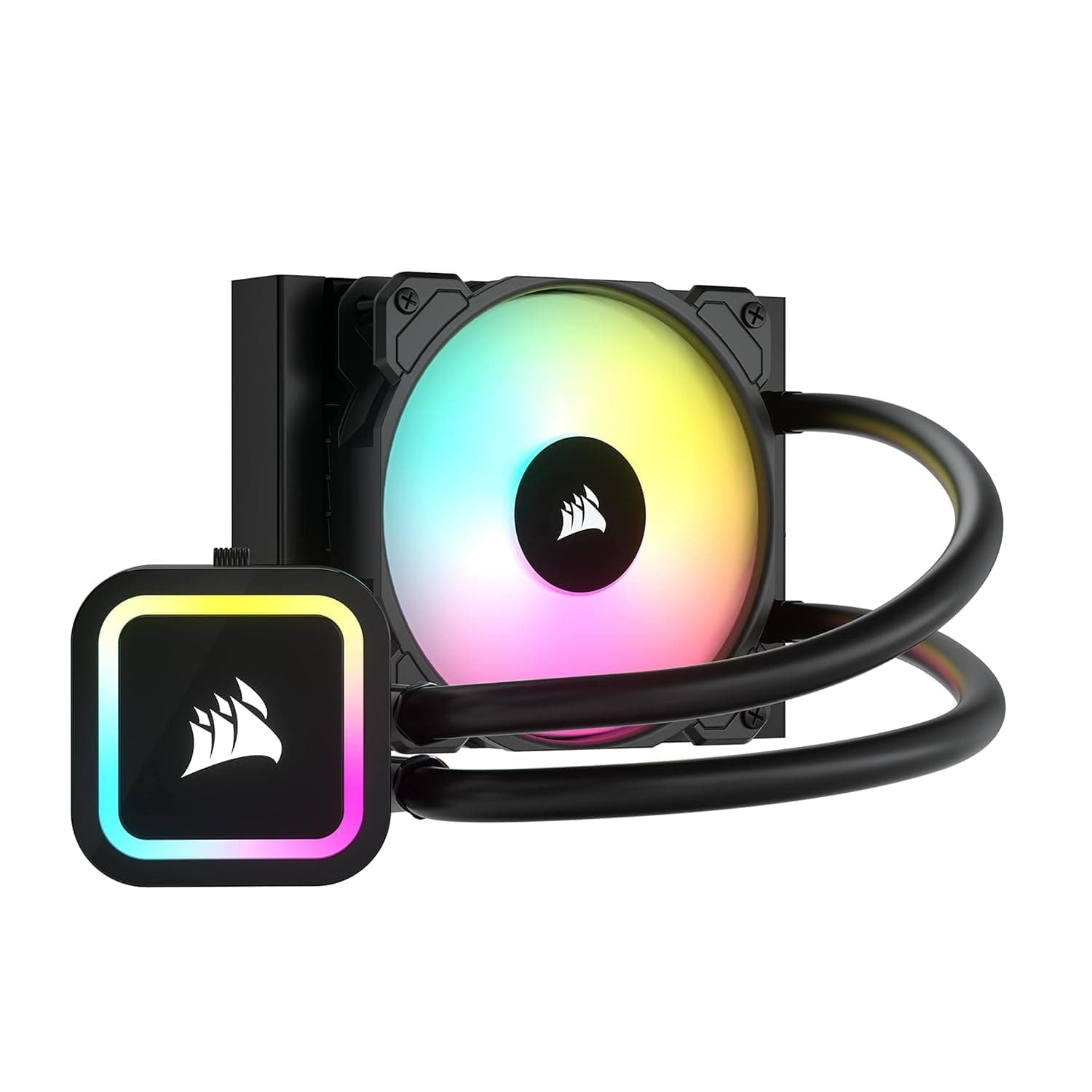
It is an entry-level AIO for people who want RGB liquid cooling at a modest price, in a case that may not take anything larger. Eight addressable RGB LEDs sit in the pump head and eight more in the SP120 Elite fan, for 16 total — visually it punches above its price bracket.
On the cooling side: 1,500 RPM maximum fan speed, 47.73 CFM maximum airflow, 28 dBA noise level.
Those are honest numbers for a 120mm AIO, tuned more toward quiet operation than raw output. The cold plate is copper, thermal compound comes pre-applied, and the tool-less mounting bracket makes this hard to get wrong on a first build.
Amazon.co.jp ratings stand at 4.2 out of 5 from 28 reviews (84% positive) as of June 2026.
With that few reviews, treat the score as broadly favorable but not statistically settled.
Compatibility Guide
Socket support is broad: Intel LGA 1700, 1200, 115X, 2066, 2011-3, 2011, plus AMD AM5 and AM4. Because LGA 1700 and AM5 are officially supported, no extra mounting kit is needed for current-generation Intel or Ryzen 7000-series and later builds.
In practice, the thing that trips people up is the case, not the socket. Check these before ordering.
| Check | What to look for |
|---|---|
| Radiator location | A 120mm fan mount at the rear or top of the case |
| Radiator + fan depth | Clearance in the rear 120mm bay; no collision with top-edge motherboard heatsinks |
| ARGB header | A 5V 3-pin ARGB header (not compatible with 12V 4-pin RGB) |
| Power connector | One free SATA power connector for the pump and LEDs |
| Fan connector | A 4-pin PWM CPU_FAN header |
The header standard matters most. This cooler runs at 5V and must never be plugged into a 12V 4-pin RGB header — the voltage mismatch can destroy the LEDs.
Headers labeled ARGB, D_LED, or ADD_GEN2 are usually 5V; RGB_HEADER or LED_C1 are usually 12V. Confirm in your motherboard manual before connecting.
Also note that advanced iCUE software control — synchronizing lighting with other Corsair gear — requires an optional iCUE controller sold separately. Without one, you control the lighting through your motherboard's utility instead (ASUS Aura Sync, MSI Mystic Light, GIGABYTE RGB Fusion, ASRock Polychrome).
Buying this expecting "it's Corsair, so iCUE just works" is the most common disappointment here.
A 120mm radiator drops into the rear bay of most mid-towers and many compact cases. Conversely, if your case already accepts a 240mm or 360mm radiator, the reason to pick 120mm is price and space — not cooling, and not noise.
Product Info
Key specifications:
| Item | Value |
|---|---|
| Radiator size | 120mm |
| Fan size / count | 120mm / 1 (SP120 Elite PWM) |
| Max fan speed | 1,500 RPM |
| Max airflow | 47.73 CFM |
| Noise level | 28 dBA |
| RGB LEDs | 8 pump + 8 fan = 16 total |
| LED voltage | 5V |
| Cold plate material | Copper |
| Power connector | SATA |
Some context on those numbers. 47.73 CFM is typical for a single 120mm fan, and against a high-restriction target like a radiator, static pressure design matters more than raw airflow.
The AirGuide technology in the SP120 Elite uses in-frame guides to concentrate the airflow so more of it actually passes through the fins. The 28 dBA figure is at maximum speed, so under PWM control in normal use the audible level drops well below that.
As for price: ¥9,081 on Amazon.co.jp as captured on June 12, 2026.
Prices move often and sales push them lower, so check the product page for the current figure before buying. Note that the collected data lists the same yen price and the same Japanese product page in the overseas price field, so it is not a usable reference for non-Japanese pricing — check your local retailer instead.
In the box: one SP120 RGB Elite fan, a mounting kit for all supported sockets, and pre-applied thermal compound. Corsair backs it with a 5-year warranty, which is reassuring for a product with a moving pump and comparable to the 5–6 years typical of air coolers in this bracket.
How It Compares: 120mm AIO vs. Air Cooling
The ~¥9,000 bracket puts this cooler head-to-head with dual-tower air coolers, and in pure thermal terms a single 120mm radiator is not the obvious winner. As a general rule, the dissipation area of one 120mm radiator holds no clear advantage over a six-heatpipe dual-tower air cooler; depending on the build, the air cooler can come out ahead.
The case for the H60x RGB Elite comes down to three things:
- It frees up space around the socket. No large heatsink means no worries about tall memory modules, top M.2 heatsinks, or VRM heatsink clearance — and easier access during maintenance.
- No heavy mass hanging off the motherboard. Big air coolers can exceed 1kg; if board sag during shipping or vertical mounting bothers you, an AIO is easier on the nerves.
- Looks. Sixteen addressable LEDs and a lit pump head produce something air cooling simply cannot.
If raw cooling capacity is the priority, buy an air cooler at this budget, or stretch to a 240mm or 360mm AIO. Being honest about that up front leads to a happier purchase.
Real-World Use
Core i5 / Ryzen 5 class chips — or modest-TDP Core i7 / Ryzen 7 parts — are this cooler's natural territory. Gaming loads rarely pin every core indefinitely, so a single 120mm radiator has room to work without spinning up.
Sustained all-core work is different. Video encoding, compiling, and rendering keep every core busy for minutes to hours, and radiator surface area shows its hand.
The fan will sit near 1,500 RPM and produce roughly 28 dBA continuously. Nearly every "I went liquid and it's still noisy" comment comes from this usage pattern.
Revisit your BIOS fan curve. The standard approach is to run the pump at 100% constantly and give the radiator fan a gentle, gradual ramp.
Leaving an aggressive default curve in place makes the fan chase every temperature spike, which is more irritating than a steady higher speed.
Installation Notes
Fit the backplate (on Intel) before installing the motherboard in the case — it saves a lot of awkward reaching.
Mount the radiator at the rear or top, ideally so the pump head is not the highest point in the loop.
Air collecting in the pump is a common source of noise. 3.
Don't forget to peel the protective film off the cold plate; the pre-applied compound is underneath it. 4.
Tighten screws gradually in a diagonal pattern so contact pressure stays even. 5.
ARGB cable to the 5V 3-pin header, pump power to SATA, fan to CPU_FAN. This is where mistakes happen.
Things to Consider
Before Buying
Start with who this is wrong for. It cannot keep up with a Core i9 or Ryzen 9 running unrestricted at full load for extended periods.
A single 120mm radiator has a hard physical ceiling on heat rejection, and temperatures will reach thermal throttling territory. For those CPUs, use at least a 240mm and preferably a 360mm unit.
The same applies to any overclocked build.
Don't buy it for iCUE. Full iCUE control requires the separately sold controller.
If you assumed "all Corsair, all iCUE," budget for that extra purchase — or decide in advance that motherboard ARGB control is good enough.
Never use a 12V RGB header. The 5V ARGB and 12V RGB connectors look similar but are not compatible, and a wrong connection can kill the LEDs.
Some older boards (certain B450 models) have no 5V ARGB header at all, in which case you'll need a standalone ARGB controller.
Understand the general AIO trade-off. Unlike an air cooler, a liquid unit depends on a pump — a moving part that can fail, and if it stops, cooling collapses immediately.
The 5-year warranty is genuinely reassuring, but this is not a "lasts longer than air" product. Choose liquid for acoustics and aesthetics, and you'll be choosing correctly.
Verify the product from the images and title on the listing page. Amazon listings sometimes carry manufacturer names, model numbers, or compatibility tables that don't match the actual product.
Socket tables in particular can pick up data from other models in the same family (H100x, H150x). Confirm the package photo says H60x RGB Elite.
Treat the listed price the same way — assume it has moved since it was captured.
Be cautious with used and parallel-import units. Pump life is finite, and a used AIO has an unknown number of running hours.
Warranty coverage can also depend on where you bought it.
Best Use Cases
First-time AIO builders are the ideal audience. Tool-less mounting, pre-applied compound, and wide socket support make this hard to install badly, and the ~¥9,000 price keeps the downside small if it turns out not to suit you.
Small-case builds are the second good fit. Where a 240mm radiator won't go, a rear 120mm bay usually will, and clearing the area around the socket helps with tall memory and M.2 heatsink access.
Lighting-focused gaming builds work well too. Sixteen addressable LEDs is generous for an AIO at this price — just remember the controller caveat for full iCUE integration.
It is not for users running high-end CPUs daily, overclockers, or anyone who ranks absolute thermal performance first. Those builds are better served by a dual-tower air cooler at the same budget or a larger radiator.
Frequently Asked Questions
Q. Will it handle a Core i7? A.
Yes, depending on your workload. It's fine for gaming; sustained all-core encoding leaves little headroom.
Setting sensible power limits (PL1/PL2) in BIOS is recommended.
Q. Is the iCUE controller mandatory? A.
No. Connected to a 5V ARGB header, lighting works through Aura Sync, Mystic Light, and similar utilities.
The controller is only needed for syncing with other Corsair gear and managing everything inside iCUE.
Q. My motherboard has no 5V ARGB header. Can I still use it? A.
Yes, as a cooler. Pump power comes from SATA and the fan from CPU_FAN, so cooling is unaffected.
You'll need a standalone ARGB controller if you want lighting control.
Q. Air cooler or this — which cools better? A.
Against a dual-tower air cooler at the same price, a single-120mm AIO holds no clear advantage. Value it for space savings around the socket and for the lighting.
Q. I'm worried about leaks or pump failure. A.
Sealed AIOs are maintenance-free in normal use, but a moving part can fail. Keep your proof of purchase for the 5-year warranty.
Persistent buzzing or gurgling usually points to trapped air or a pump problem.
Q. Can I add a second fan for push-pull? A.
Physically yes, but the gain on a 120mm radiator is small. That money is better spent on a larger radiator.
Product Disclosure (Amazon)
- Manufacturer: CORSAIR
- ASIN: B0FKDBBS3Y
- Note: This article covers a manufacturer-made product based on Amazon listing details.