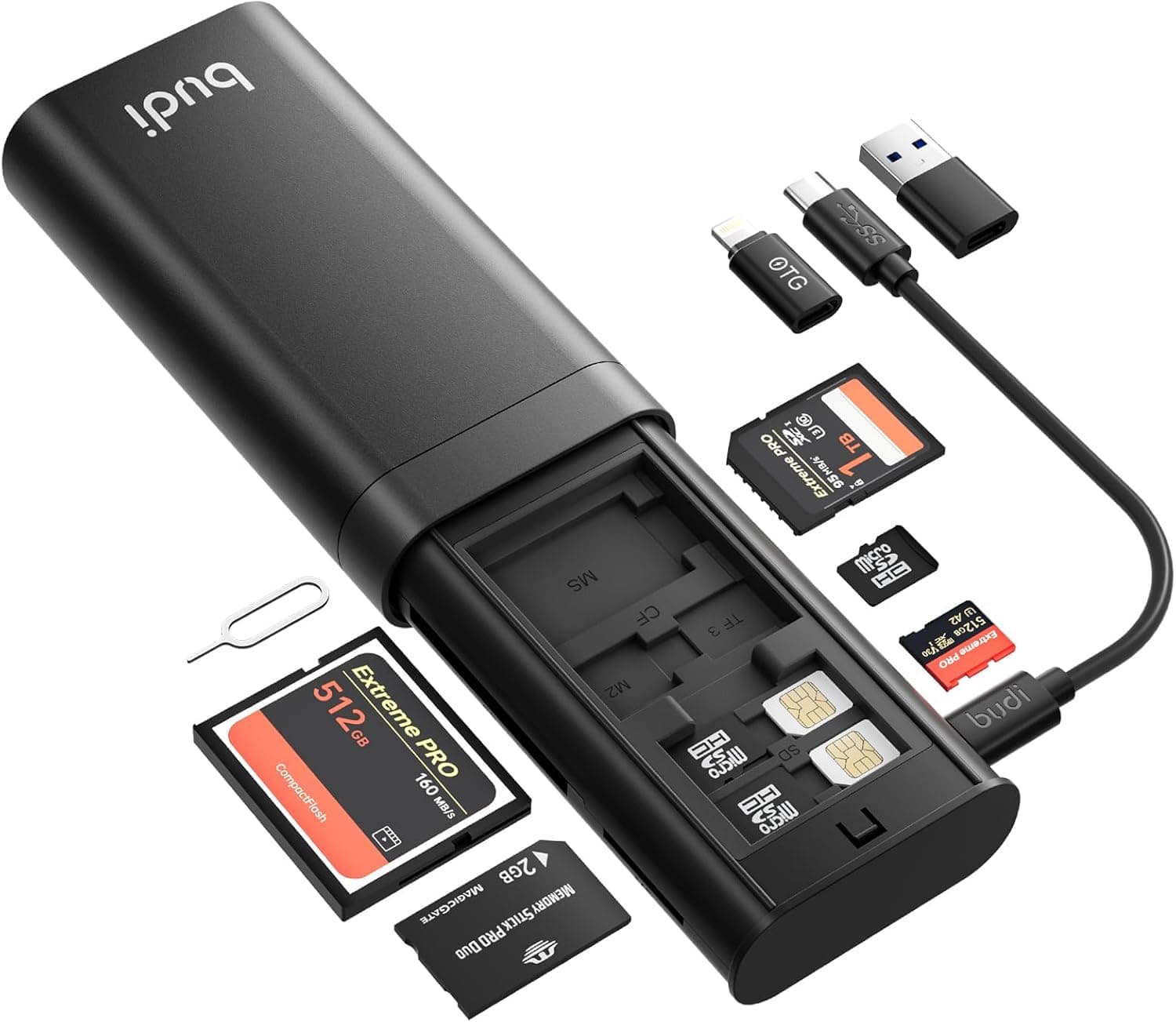
The BUDI 7-in-1 Multi-Function SD Card Reader combines a seven-slot reader (SD, TF/microSD, CF, MS, M2) with an integrated card storage case. This article uses the published specs and Amazon.co.jp review data (1,060 reviews, 4.4 out of 5 stars / 88% positive, captured 2026-05-31) to explain where it fits and what you have to accept.
Overview
The honest framing: this is not a speed-focused reader. It is a card case with a reader built into it.
The interface is USB 3.0 Type-C (up to 5Gbps), the body measures 120×61×27 mm, and it weighs 156g — small enough to disappear into a camera bag.
It suits people who routinely mix card formats: SD from a mirrorless body, CF from an older DSLR or cinema camera, microSD from drones and action cams. If you only ever offload SD cards, better options exist.
Media Support and Real-World Speed
The 5Gbps figure is the USB 3.0 (USB 3.2 Gen 1) interface ceiling, not what your files will move at.
As a general rule, UHS-I SD cards top out around 100MB/s because of the card itself, so a faster reader changes nothing there. The bandwidth only matters with UHS-II cards, fast CF media, or long sequential reads.
| Item | Value | How to read it |
|---|---|---|
| Interface | USB 3.0 Type-C | USB-A ports may need an adapter |
| Transfer speed | Up to 5Gbps | Theoretical; real speed depends on the card |
| Media | SD, TF, CF, MS, M2 (7 slots) | No simultaneous transfer |
| Max capacity | 512GB per slot | 1TB+ cards are out of spec |
| Size / weight | 120×61×27 mm / 156g | Typical for a case-style reader |
| OS support | Windows, Mac, Linux, iOS (OTG), Android | iOS requires OTG support |
Two rows matter most: the 512GB per-slot limit, which rules the product out for anyone on 1TB cards, and the lack of simultaneous transfer, which contradicts the natural assumption that seven slots means seven cards at once. In practice you swap cards one at a time.
Connectivity & Compatibility
The documented notes are: no simultaneous transfer across slots, desktop PCs may need a Type-C to USB-A adapter, and OTG-capable mobile devices can connect directly. Here is what actually trips people up.
- Desktop PCs: with a Type-C-only connection, boards that expose only USB-A need an adapter or a C-to-A cable. Make sure it is a data cable — charge-only cables will not enumerate the device.
- iPhone / iPad: USB-C iPhones (15 and later) and recent iPads can usually connect directly. Lightning-era iPhones need a camera adapter. The iOS Files app generally expects FAT32/exFAT, which is what in-camera formatting produces anyway.
- Android: the phone must support USB OTG. Some devices disable OTG by default or time it out, so check settings if nothing mounts.
- Power: it is bus-powered, but chaining it behind an unpowered hub can cause flaky detection. Plug directly into the machine when troubleshooting.
Product Info
As captured on 2026-05-31, the Amazon.co.jp listing showed ¥12,022.
Prices move constantly with sales and stock, so check the product page for the current figure before buying. The eBay side shows per-listing pricing only, with no stable reference point.
That price is high for a card reader. The bundle includes six multi-cables and a carrying case, which explains part of it, but paying ¥12,022 for reader performance alone would be poor value.
Comparable 7-in-1 readers without the case and cables cost considerably less. Whether the full kit is worth it is the real decision.
On reviews: 1,060 ratings at 4.4 out of 5 (88% positive) as of 2026-05-31.
For an accessory from a lesser-known brand, a four-figure review count is a reasonable signal that you are not gambling on a one-off unit. Warranty is stated as 12 months.
Product Disclosure (Amazon)
- Manufacturer: BUDI
- Seller: Dshop11
- Fulfilled by: Dshop11
- ASIN: B0CLTG3QTX
- Note: This article covers a manufacturer-made product based on Amazon listing details.
Compared With the Alternatives
There are three broad options. All-in-one readers like this one handle any format from one device, at the cost of unremarkable per-slot speed.
Single-format readers (CFast, XQD, CFexpress) accept far less but deliver the most stable throughput for that format. Phone-direct readers target offloading in the field without a laptop.
This unit wins when CF, SD, and microSD all live in the same bag. It is simply not a candidate if your workflow has standardised on CFexpress or XQD, since those slots do not exist here.
Write down your actual card lineup before choosing.
Best Use Cases
Ideal for photographers and video creators juggling several cameras, drones, and action cams, where SD, CF, and microSD travel together. Keeping easily-lost microSD cards in the same housing as the reader is a genuine day-to-day benefit on location.
It also suits people who connect to an OTG phone or tablet to preview and lightly edit on the road, or who travel without a laptop. If you sit at a desktop offloading hundreds of gigabytes daily, look elsewhere.
Things to Know Before Buying
1. Seven slots does not mean seven at once. Batch-copying several cards in parallel is not supported.
Most slots serve as storage; transfers happen one card at a time. Buying this to speed up backups will disappoint you.
2. Cards over 512GB are out of spec. If 1TB SD or microSD cards are your workhorses, treat compatibility as unproven — the stated ceiling is 512GB per slot.
3. Not for speed-critical work. It is not designed to extract the full performance of UHS-II or CFexpress media.
For daily 4K ingest, a format-specific reader will save more time overall.
4. Verify the price yourself. ¥12,022 is at the expensive end for this category, and the captured data showed a mismatch between the channel label (Amazon US) and the actual link (Amazon.co.jp, yen).
Automatically collected pricing sometimes attaches to the wrong product, so confirm currency and amount on the page.
5. Do not take the listing metadata at face value. With accessories like this, the listing's manufacturer, model, and bundle contents can differ from what ships, especially when the seller and fulfiller are third parties (here, Dshop11) rather than the brand.
Check the product images, title, and reviewer photos to confirm you are getting the configuration you want.
6. Manage expectations on the bundled cables. The six multi-cables are general-purpose charge/data cables; they do not affect the reader's throughput.
Judge the price on whether the whole kit is useful to you.
FAQ
Q. Can I copy from all seven cards at once? A.
No. Simultaneous transfer is not supported; you read one card at a time and the other slots act as storage.
Q. Will a 1TB microSD work?
A. The published limit is 512GB per slot. Anything larger is outside the guaranteed range.
Q. Can I plug it straight into an iPhone? A.
USB-C iPhones and iPads can generally connect via OTG. Lightning models need a camera adapter.
Check the listing for supported devices.
Q. What do I need for a desktop USB-A port? A.
A Type-C to USB-A adapter or a data-capable C-to-A cable. Charge-only cables will not work.
Q. Do I really get 5Gbps? A.
That is the interface ceiling. Actual speed is set by the card — with UHS-I media, the card is the bottleneck.
Q. It is not being recognised. What now? A.
Plug directly into the computer to rule out hubs and extensions, then try a different card, then reformat in-camera.