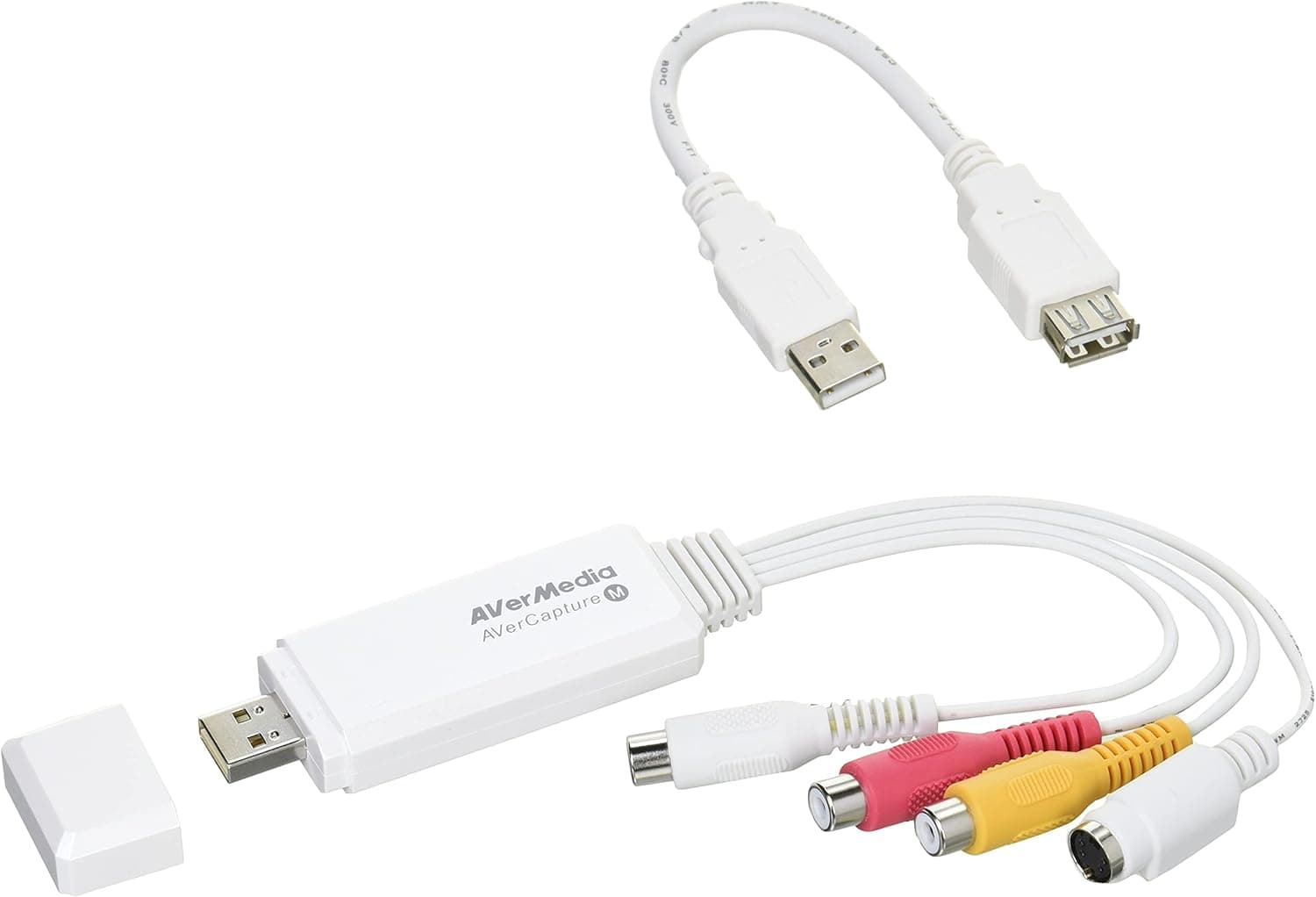
The AVerMedia AVT-C039 is a USB game capture device with S-Video and composite (RCA) inputs only. This article covers which consoles actually work, why its Amazon rating sits at 2.8, and who should avoid it.
Overview
The AVT-C039 is an entry-level capture device for consoles that output analog video. It connects to a PC with a single USB cable and needs no external power.
No recording software is bundled — it is designed to be used as a video input device from third-party applications such as OBS Studio. Both Windows and Mac OS X are supported.
In short, this is a tool for recording retro console footage where convenience matters more than image quality. It cannot handle HDMI at all, so it should never be on your shortlist for capturing current-generation consoles.
Getting this wrong is the number one cause of buyer regret here.
Compatibility Guide
The input is switchable between S-Video and composite; you cannot use both at once. AVerMedia lists PS3, PS2, Wii U, Wii and Famicom as compatible — all of them share one trait: an analog video output.
There is no HDMI input, so PS4, PS5, Xbox One and later, and Nintendo Switch cannot be connected directly.
| Source | Direct connection | Notes |
|---|---|---|
| PS2 / Wii / Famicom | Yes | Composite or S-Video |
| PS3 / Wii U | Yes | Must switch console output to analog first |
| PS4 / PS5 / Switch | No | HDMI-only; needs a downconverter |
| VCRs / camcorders | Yes (as video) | Copy-protected sources may not capture |
The "No" rows can technically be made to work with an HDMI-to-composite converter, but downscaling a modern console to standard definition and then capturing it defeats the purpose. If you want to record current consoles, buy a device with a real HDMI input.
One easily missed point is resolution. S-Video and composite are standard-definition formats (roughly 480i), so footage through this device will never become Full HD.
Uploaded to YouTube, it will look softer than you remember it on a CRT. That is a limit of the standard, not a defect.
When connecting a PS3 or Wii U over analog, change the console's video output setting to composite/S-Video first, or you will get a black screen. Change the setting while still on HDMI, then swap cables.
Product Info
| Item | Detail |
|---|---|
| Input connectors | S-Video, composite (RCA) |
| Interface | USB (USB 2.0 compatible) |
| Supported OS | Windows, Mac OS X |
| Recording scheduler | Yes |
| Model | AVT-C039 |
The recording scheduler quietly matters for non-gaming use. Because you can start an analog recording at a set time, digitizing tapes from a VCR or an analog camcorder can run unattended.
This is not purely a game-streaming product.
Pricing varied sharply between captures. Amazon.co.jp showed ¥5,500 as captured on June 4, 2026, while Rakuten (Mujica & Felice store) showed ¥16,218 as captured on August 17, 2026 — nearly a threefold gap.
That is common for a product several years past launch with thinning stock. Both figures are snapshots from those dates, not today's price; always check the listing for the current figure.
The rating deserves an honest mention: 2.8 out of 5 stars from 32 Amazon reviews (captured June 4, 2026), roughly 56% positive.
With only 32 reviews the sample is small, but it clearly is not a universally loved product. Be skeptical of any article that hides that number.
Real-World Use and Why the Rating Is Low
The 2.8 rating is explainable from the product's nature.
First, no software is bundled. Buyers who expect "plug in USB and record" must install and configure capture software themselves, and some give up there.
Anyone comfortable with OBS Studio's video capture device settings will be fine; first-timers hit a wall.
Second, the analog SD ceiling is not obvious from the product name, which mentions recording and live streaming. Expectations of high-definition streaming collide with standard-definition reality.
Third, the product is several years old, so driver compatibility reports on newer OS versions are more likely. Check current OS compatibility before buying.
How It Compares
Within AVerMedia's own lineup, HDMI-equipped models exist for modern consoles. By use case:
- Recording PS2 / Wii / Famicom — you need an analog input device like this one; HDMI cards cannot do it without a converter.
- Recording PS5 / Switch in high quality — choose a 4K-capable model with HDMI passthrough. Not this one.
- Recording without a PC — choose a standalone recorder; this device requires a PC.
- Turning a camcorder into a webcam — choose a UVC HDMI input device.
This product is not a general-purpose alternative to anything; it is chosen for one reason only — analog input. If you own no analog hardware, there is no reason to buy it.
Best Use Cases
It suits people who still own PS2, Wii, Famicom or similar consoles with S-Video or composite output and want to record that gameplay. Doing the same with an HDMI capture card means adding a converter, more boxes, more latency and more quality loss.
A direct analog input keeps the signal path simple.
It also suits anyone digitizing footage from VCRs or analog camcorders. The recording scheduler makes long unattended transfers practical.
Finally, if you are comfortable enough with a PC to configure OBS Studio yourself, setup should not be a problem.
Before You Buy
The most important caveat is the absence of HDMI input. If you want to record a PS4, PS5, Xbox One or later, or a Nintendo Switch, do not buy this.
The product name mentions recording and live streaming, which misleads people into assuming modern console support. It is clearly out of scope.
Second, do not expect image quality. Analog SD input means no 1080p or 4K capture.
Only buyers who accept "footage that looks like the era it came from" will be satisfied — and some will consider that period-accurate look a benefit.
Third, you must supply your own software. Install OBS Studio or similar, select this unit as a video capture device, and configure audio separately.
Audio arrives through the red/white RCA connectors, and "video works but there is no sound" is by far the most common first-time setup problem.
Fourth, price spread and stock. As noted, the captured prices were ¥5,500 and ¥16,218 at different dates.
On a product this old, store-to-store variance is large. If you see a price above ¥10,000, compare it against a current HDMI capture device before committing.
Finally, a word about listing data. Capture devices are frequently confused with similar-looking products or other model numbers from the same seller.
Before ordering, check the listing photos for the actual connectors — the round 4-pin S-Video jack and the yellow/red/white RCA jacks. Ordering on the model number alone can land you a different model, or even a converter that goes the wrong direction.
FAQ
Q. Can I connect a Nintendo Switch? A.
Not directly. The Switch outputs HDMI only and this device has no HDMI input.
An HDMI-to-composite converter would work technically, but the quality loss makes it impractical.
Q. Is recording software included?
A. No. You need to supply your own, such as OBS Studio.
Q. Does it work on a Mac? A.
It is specified for both Windows and Mac OS X. Because the product is several years old, behavior on the latest OS versions is not guaranteed — check the listing or manufacturer information first.
Q. What quality can I record at? A.
S-Video and composite are standard-definition formats (roughly 480i), so Full HD capture is not possible. Expect something close to what a CRT of that era showed.
Q. Does it capture audio too? A.
Yes, via the red/white audio connectors on a composite cable. You must select the audio input separately in your software, or you will end up with a silent recording.
Q. Can I capture non-game video? A.
Yes — any device with S-Video or composite output, such as a VCR or analog camcorder. The recording scheduler helps with long tape transfers, though copy-protected sources may not capture.
Product Disclosure (Amazon)
- Manufacturer: AVerMedia
- Seller: OAK通信販売部 uzumasa48
- Fulfilled by: OAK通信販売部 uzumasa48
- ASIN: B00IEVSCKC
- Note: This article covers a manufacturer-made product based on Amazon listing details.
![AVerMedia Ez Recorder 330 ER330 [PC不要]](/_next/image?url=https%3A%2F%2Fm.media-amazon.com%2Fimages%2FI%2F61CIZJ5HHpL._AC_SL1500_.jpg&w=1920&q=75)
![AVerMedia HDMI usb Live Gamer Portable 2 PLUS AVT-C878 PLUS [4Kパススルー対応 ゲームの録画・ライブ配信用キャプチャーデバイス] DV478 macOS](/_next/image?url=https%3A%2F%2Fm.media-amazon.com%2Fimages%2FI%2F71Oj65360WL._AC_SL1500_.jpg&w=1920&q=75)