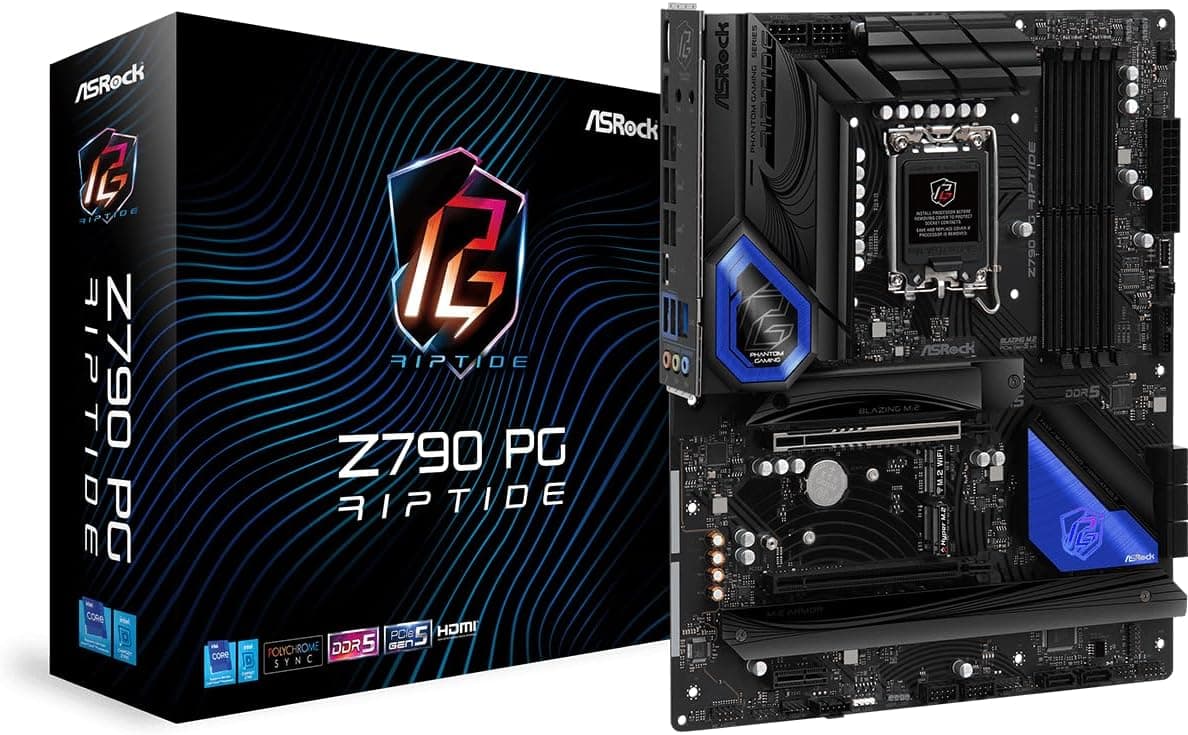
Overview
The ASRock Z790 PG RIPTIDE is an ATX motherboard built around the LGA1700 socket for Intel 12th Gen (Alder Lake) and 13th Gen (Raptor Lake) Core processors. The short verdict: it is a practical, no-frills board for builders who want Z790 features without paying for onboard Wi-Fi or heavy styling. It keeps the essentials shared with pricier boards — a 14+1+1 phase power stage with Dr.MOS, four DDR5 slots rated to 6800MHz+ (OC), and a PCIe 5.0 x16 slot — while moving wireless connectivity out to an M.2 Key-E slot that ships empty.
As captured on 28 May 2026, the Amazon.co.jp listing showed ¥39,798.
Motherboard pricing moves with exchange rates, sales, and platform transitions, so treat that number as a snapshot from that date rather than a current price. Amazon reviews stood at 36 with an average of 4.5 out of 5 stars (90% positive, captured 27 May 2026).
That is a stable score, but 36 reviews is a small sample — enough to suggest no widespread defect, not enough to be statistically meaningful. Read it alongside reviews of competing Z790 boards.
Compatibility Guide
The first thing to internalize: this board is DDR5-only. The compatibility data lists DDR5 as the sole supported memory type.
Because LGA1700 CPUs themselves support both DDR4 and DDR5, and DDR4 versions of many boards exist, it is easy to assume existing memory will carry over. It will not — DDR4 modules are physically keyed differently and there is no adapter.
Budget for a new DDR5 kit.
Supported CPUs are LGA1700 Core i9/i7/i5/i3 parts from the 12th and 13th generations. 14th Gen (Raptor Lake Refresh) uses the same socket, but whether it boots depends on the installed BIOS version. This is the biggest risk when buying older stock or used units.
Many ASRock LGA1700 boards include a BIOS Flashback-style feature that updates firmware without a CPU installed, but confirm on the product page and manual whether this specific unit has it — otherwise you may need to borrow an older CPU just to update.
Expansion consists of one PCIe 5.0 x16, one PCIe 4.0 x16, and one PCIe 3.0 x1 slot.
Note that a second physical x16 slot is commonly wired with fewer electrical lanes than its size suggests. Check the slot bandwidth table in the manual before planning around a second graphics card or a capture card.
If multi-GPU is your goal, this is not the board for it.
Power connectors are 24-pin ATX and 8-pin EPS12V, with a recommended PSU of 750W. That figure suits a mid-range build; a Core i9 paired with a high-end GPU deserves headroom above it, while a Core i5 with a mid-range GPU leaves 750W with plenty to spare.
The ATX form factor requires a full ATX case — it will not fit micro-ATX enclosures.
| Item | Spec | Where builders trip up |
|---|---|---|
| CPU socket | LGA1700 | 14th Gen depends on BIOS; verify on used units |
| Memory | DDR5 only, 4 slots, 128GB max | DDR4 will not fit — the most common planning error |
| Memory speed | 6800MHz+ (OC) | Four-DIMM configs typically drop back to base speeds |
| Expansion | 1x PCIe 5.0 x16, 1x 4.0 x16, 1x 3.0 x1 | Second x16 lane count needs a manual check |
| Wireless | M.2 Key-E slot only | Card and antenna sold separately |
| Recommended PSU | 750W | Go higher for i9 plus a high-end GPU |
Why Four DIMMs Won't Hit the Rated Speed
The 6800MHz+ (OC) figure should be read as a two-DIMM number — one module per channel. DDR5 puts far more strain on the memory controller with four modules populated, and every vendor's boards see meaningful speed regressions in that configuration.
Buying 32GB x4 because the board tops out at 128GB can leave you with more capacity but an XMP profile that refuses to post.
The practical advice is straightforward: if you need capacity, buy a high-density two-stick kit such as 32GB x2. That preserves speed, keeps two slots free for later, and avoids the mixed-kit problems that show up when you add memory months later (even identical part numbers can fail to run together at rated timings).
The board supports Intel XMP 3.0, so a compatible kit is just a profile selection in BIOS.
How It Compares
Z790 spans a wide price range, and this board sits near the lower end of it. Against boards like the ASRock Z790 Taichi or MSI MAG Z790 Tomahawk MAX WiFi, you give up onboard Wi-Fi, rear I/O port count and speed, more elaborate M.2 heatsinks, and larger VRM heatsinks.
Put the other way: if you run your CPU at stock and use wired networking, much of the premium on higher-tier boards buys features you will never touch.
The harder comparison is against B760. B760 drops CPU overclocking and offers fewer chipset PCIe lanes, but DDR5 and PCIe 5.0 options exist and cost clearly less.
The decision rule is simple: are you buying a K-series CPU to overclock manually, or running several NVMe drives and expansion cards at once? If neither applies, B760 is the more rational buy.
If either does, Z790 earns its price.
Product Info
Key specifications: Intel Z790 chipset, four DDR5 DIMM slots (128GB max, 6800MHz+ OC), one PCIe 5.0 x16, one PCIe 4.0 x16, one PCIe 3.0 x1, an M.2 Key-E slot for Wi-Fi, multiple SATA ports, HDMI and DisplayPort video outputs, and a 14+1+1 phase power design.
Those video outputs matter more than people expect — they let you build with an iGPU-equipped CPU and, crucially, give you a way to isolate a suspected graphics card failure.
One gap worth flagging: the spec sheet available for this article does not state how many M.2 slots are available for NVMe storage. Only the Wi-Fi Key-E slot is listed, so the count of storage M.2 sockets — and whether any run at PCIe 5.0 — cannot be confirmed from this data.
SATA ports are listed only as "multiple," with no exact count. If you plan on two or more NVMe drives, verify the count and supported speeds on the manufacturer's product page before ordering.
On pricing, Amazon.co.jp showed ¥39,798 as captured on 28 May 2026.
An eBay US marketplace listing showed $94.99 as of 9 July 2026, but that is not comparable to a new, domestically warrantied unit — such listings are typically used, bulk, or without warranty.
A price gap you cannot explain is a reason for caution, not excitement. Check current pricing before you buy either way.
Review data from Amazon.co.jp: 36 reviews averaging 4.5 out of 5 stars (90% positive, captured 27 May 2026).
With a sample that small, it is worth reading individual reviews to find users running a build similar to yours.
Best Use Cases
Core i5 and i7 builders planning to keep a system for years. The 14+1+1 phase design is more than adequate for stock and mild overclock operation, and skipping onboard Wi-Fi and RGB flourishes lets you push budget toward the CPU and GPU.
Desktop users on wired Ethernet. If your machine is permanently cabled, onboard Wi-Fi is a feature you would never use, and not paying for it is simply good sense.
Anyone starting fresh on DDR5. With no DDR4 investment to protect, the DDR5-only restriction costs you nothing and leaves future upgrades unconstrained by an older memory standard.
Builders who may run a PCIe 5.0 graphics card later. Few current cards saturate PCIe 5.0 bandwidth, but on a board you intend to keep for several years, having the slot is worth something.
It is a poor fit for small-form-factor builds (ATX only), multi-GPU setups, anyone who needs built-in wireless, and anyone hoping to reuse DDR4 memory.
Things to Consider
"You can add Wi-Fi later" is more work than it sounds. The M.2 Key-E slot does accept a Wi-Fi card, but the card is only part of it.
You also need antennas, antenna cabling routed to the case rear, and usually an internal USB header connection for Bluetooth. Retrofitting a finished build often means pulling the graphics card first.
If wireless is a requirement, buy a board with Wi-Fi onboard or use a USB adapter instead. Underestimating this is the single most common regret with boards in this class.
14th Gen support is not guaranteed out of the box. Shipping BIOS versions vary by production batch, and an un-updated board will not even produce video with a 14th Gen chip installed.
If that is your build plan, confirm the board supports CPU-less BIOS updates, or buy from a retailer that states the BIOS has been updated.
Verify the Amazon listing details yourself. In the source data behind this article, one pricing entry was labeled "Amazon US" while carrying a yen price and a Japanese product page — the collection layer mixed its labels.
Amazon listings themselves sometimes carry seller, model number, or manufacturer fields that do not match the actual product. Check the product images and title, and confirm the seller is trustworthy.
For motherboards specifically, whether the unit is domestic authorized-distributor stock affects your warranty path.
Z790 on the box does not mean every Z790 performs alike. VRM cooling capacity, M.2 slot count, and rear I/O differ substantially between boards on the same chipset.
This is a cost-conscious design, so sustained all-core loads on a Core i9 — long rendering or encoding sessions — are better served by a board with more cooling investment. For gaming-focused builds it is a non-issue.
Factor in the platform's age. LGA1700 has already been superseded, so building on this board means your CPU upgrade ceiling is fixed at 14th Gen.
That is fine if the performance available today satisfies you, but if your plan involves dropping in a much faster CPU a few years from now, there is effectively nowhere to go.
FAQ
Q. Can I use DDR4 memory? A.
No. The board is DDR5-only.
The notch positions differ, so DDR4 modules will not physically seat, and no adapter exists.
Q. Does it have Wi-Fi? A.
Not out of the box. You need to install a Wi-Fi card in the M.2 Key-E slot (antennas required) or use a USB Wi-Fi adapter.
Q. Is it suitable for a Core i9-13900K? A.
The 14+1+1 phase design supports it. For sustained heavy all-core workloads, a board with stronger VRM cooling is the safer choice.
Plan on 750W or more of PSU capacity.
Q. Will 14th Gen Core CPUs work? A.
The socket matches, but it depends on the BIOS version. An un-updated board may not boot, so confirm your update path before buying.
Q. Z790 or a B760 board? A.
Choose Z790 if you plan to manually overclock a K-series CPU or run several expansion cards and NVMe drives at once. Otherwise B760 delivers better value.
Q. How many NVMe SSDs can it take? A.
The spec data available here lists only the Wi-Fi Key-E slot, so the storage M.2 count cannot be confirmed.
Check the manufacturer's product page.
Product Disclosure (Amazon)
- Manufacturer: ASRock
- Seller: GREENAPPLE!!
- Fulfilled by: GREENAPPLE!!
- ASIN: B0BJZBX2N7
- Note: This article covers a manufacturer-made product based on Amazon listing details.