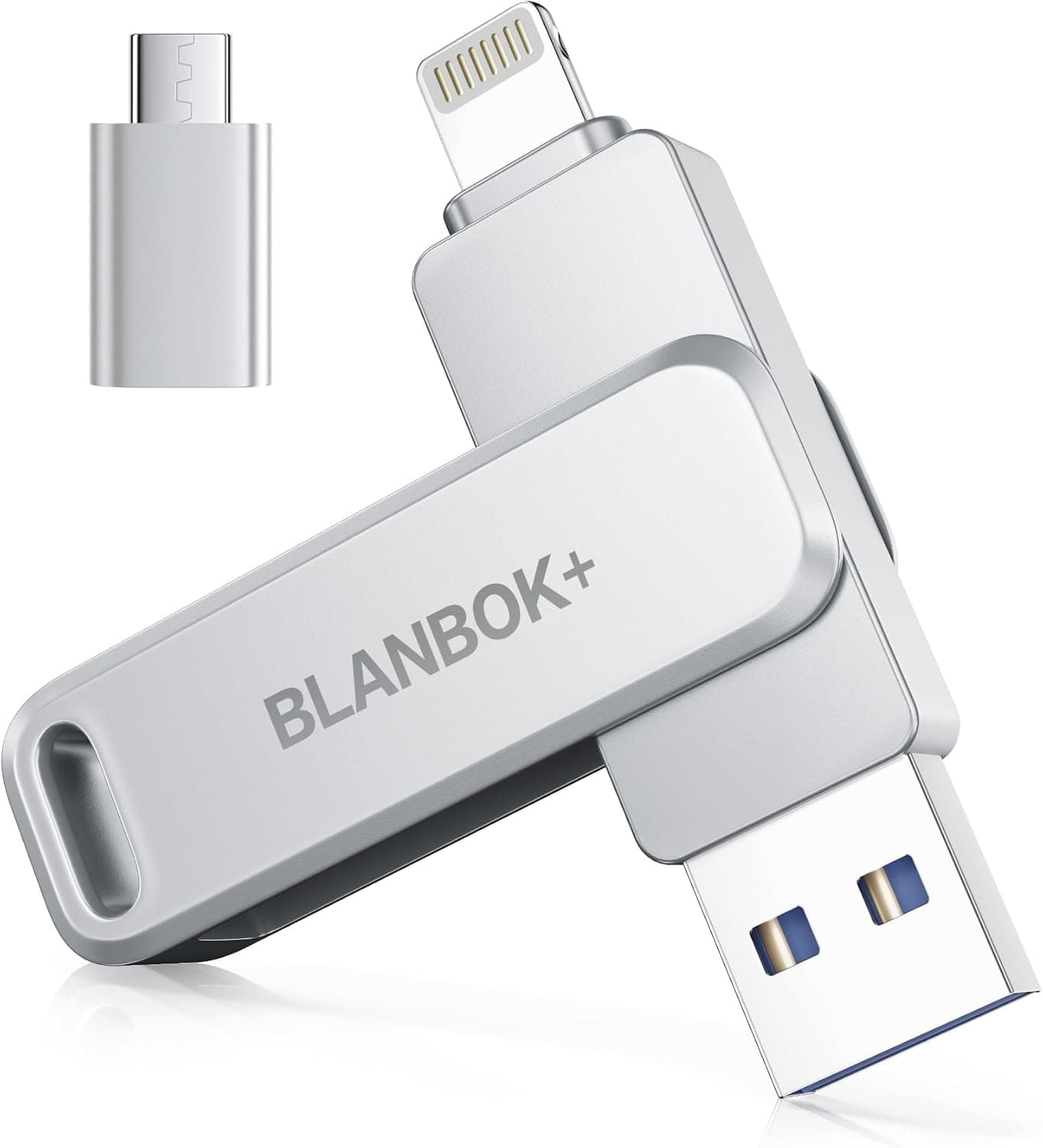
The BLANBOK+ 128GB flash drive packs four connectors — Lightning, USB-A, USB-C and micro USB — into a single metal body. This article looks at which devices it actually works with, what the 80MB/s rating means in practice, and who should skip it.
Overview
The short version: this is a drive for people who want to offload phone photos and videos on the spot, without going through the cloud. It is not a working drive for a PC or a scratch disk for video editing.
Its rated 80MB/s read and 40MB/s write sit an order of magnitude below a USB 3.2 external SSD (roughly 1,000MB/s class).
The real value here is not speed — it is Apple MFi certification (Made for iPhone/iPad) plus the connector count. MFi products carry an Apple-specified authentication chip, which lowers the risk of the dreaded "this accessory is not supported" message after an iOS update compared with uncertified budget drives.
That is the practical difference against no-name rivals at the same price.
As of the 28 July 2026 capture, the Amazon.co.jp listing showed 5,714 reviews at 4.1 out of 5 stars (about 82% positive).
That review count is high for a phone-oriented flash drive in this bracket. The gap to a perfect score most likely reflects the companion app experience and the modest transfer speed, both covered below.
Compatibility Guide
Each connector targets a different host:
| Connector | Target device | Notes |
|---|---|---|
| Lightning | iPhone / iPad, iOS 12.1 or later | Lightning-equipped models up to the iPhone 14 generation |
| USB-A | Windows / Mac and similar hosts | Most universally useful |
| USB-C | iPhone 15 and later, recent Android, MacBook | The current mainstream |
| micro USB | Older Android handsets | Requires OTG support |
The first thing to check is whether your iPhone uses Lightning or USB-C. Apple moved to USB-C from the iPhone 15 generation, so the Lightning connector applies to iPhone 14-era devices and earlier.
The drive also carries USB-C, so either generation can physically connect — but the USB-C path is a different route from the MFi-certified Lightning one, so behaviour on the iOS side may not be identical. Confirm your exact model appears in the listing's compatibility section before buying.
On Android, the requirement is OTG (USB On-The-Go) support, which lets the handset act as a USB host. Most recent phones support it, but some budget models disable it.
Some devices expose an OTG toggle in settings — check there first if the drive is not detected. As for micro USB, with virtually all current Android phones on USB-C, treat it as insurance for older hardware still in a drawer rather than a headline feature.
On the PC side, the USB-A connector works driver-free on both Windows and macOS. The drive typically ships formatted as exFAT or FAT32; you need exFAT to store files larger than 4GB, such as long 4K clips.
If it arrives as FAT32, reformatting to exFAT on a PC removes that limit.
Product Info
rmation
On Amazon.co.jp the price was ¥3,180 as captured on 18 August 2026, and ¥3,980 as captured on 28 July 2026.
A roughly ¥800 swing in under a month tells you what to expect: coupons and time-limited sales move this category constantly. Treat any figure here as a snapshot and check the product page for the current price.
Around ¥3,000 for 128GB is normal to slightly cheap for a phone flash drive.
Key specs: 128GB capacity, up to 80MB/s read, up to 40MB/s write, four connectors, MFi certified. The box contains the drive and a keychain — no case, no cable.
The metal body has a keyring hole so it can ride on a bag or key bundle. Warranty is handled as refund or replacement by the manufacturer.
To translate 40MB/s write into something concrete: at 5MB per phone photo that is roughly eight photos per second, or a little over two minutes for 1,000 shots. Move several multi-gigabyte 4K clips, however, and you are waiting in ten-minute blocks.
Fine for photo backup; underwhelming as a daily video shuttle.
Living With It: The App
On iPhone, copying photos and videos runs through the companion app (Luxsync Pro). That is not specific to this product — iOS requires an app to bridge the photo library to external storage.
The app also offers encryption and password protection, which reduces the fallout if you lose the drive.
That app dependency is also the most likely source of the missing star in the ratings. Manufacturer utility apps are rarely polished, translations can be awkward, and updates sometimes lag behind major iOS releases.
Data written through proprietary encryption may not be readable straight from a PC, so for photos you want to keep for years, plain unencrypted copies are the safer choice for future retrieval.
How It Compares With Other External Storage
"External storage" covers very different tools. A flash drive like this costs more per gigabyte but needs no cable and no power, and fits in a pocket.
An external SSD drops the cost per gigabyte and raises speed by an order of magnitude, but needs a cable and is not something you plug into a phone all day. Multi-terabyte external HDDs are cheapest per gigabyte but assume desk-bound use.
So: "my phone is full right now" is this product's problem to solve, while "I want every photo and video archived" belongs to an external SSD or HDD. The pragmatic setup is both — this drive for first-stage rescue off the phone, a larger drive for long-term storage.
Best Use Cases
- iPhone owners permanently out of space: dump photos on the spot with no iCloud upgrade and no PC sync. 128GB absorbs several thousand to around ten thousand phone photos.
- People moving between iPhone, Android and PC: the connectors are all on one stick, so no adapter to carry.
- Travel and on-site shooting: no cable, no power, just plug in and free the phone the same day.
- Anyone burned by an uncertified budget drive: MFi certification is meaningful insurance against an iOS update breaking the accessory.
It is a poor fit for shuttling video-editing footage, for use as a PC's main or secondary drive, or for terabyte-scale backups. Those jobs call for an external SSD or HDD.
Things to Check Before Buying
Accept the speed as the price of convenience. 40MB/s write feels slow if you are used to USB 3.x external SSDs, and over Lightning the port itself constrains bandwidth, so do not count on the rated figure.
Start big transfers before bed.
Understand the app dependency up front. iPhone use assumes the companion app; if updates stall, future iOS versions could become awkward.
If you use encryption, keep a second backup elsewhere, because that data may only open in that app.
Do not buy it for the micro USB connector. Current Android phones are essentially all USB-C, so micro USB is a nice-to-have.
Check the port on your own device first.
Never make a flash drive your only backup. It is small, easy to lose, and a metal shell does not survive every drop or spill.
Pair it with cloud storage or a second drive.
Read the listing details carefully. Product page metadata is partly generated automatically and can drift from reality — for this product, the price label named an overseas store while the currency and URL were Japanese.
Cross-check the product images, title and compatibility list against your own device before ordering.
Mind the capacity wording. 128GB is a decimal figure, so the usable capacity your OS reports will be lower.
That is standard across all storage products, not a defect.
Frequently Asked Questions
Q. Does it work with iPhone 15 and newer? A.
It has a USB-C connector, so it can physically connect. Support still depends on the model and iOS version, so confirm your model is listed on the product page first.
Q. Can I move iPhone photos without a computer? A.
Yes — that is the main use case. The companion app copies photos and videos to the drive so you can delete them from the phone and reclaim space.
Q. How many photos fit? A.
At 3–5MB per phone photo, over 20,000 by simple arithmetic. If you shoot mostly 4K video, which eats hundreds of megabytes per minute, the real figure drops sharply.
Q. What if transfers feel slow? A.
The ratings are 80MB/s read and 40MB/s write. Many small files transfer far below the theoretical figure, so a few large videos and several thousand photos feel very different.
Buy expecting the rated numbers, not more.
Q. What file system does it use, and can it hold files over 4GB? A.
FAT32 caps single files at 4GB. For long 4K clips, reformat to exFAT on a PC first.
Q. Is encryption required? A.
No. It helps for sensitive data you would hate to lose with the drive, but it deepens the app dependency — for straightforward long-term storage, plain files are easier to retrieve later.
Product Disclosure (Amazon)
- Manufacturer: BLANBOK+
- Seller: XTL-JP Direct
- Fulfilled by: Amazon
- ASIN: B0HBPNMDSL
- Note: This article covers a manufacturer-made product based on Amazon listing details.