Overview
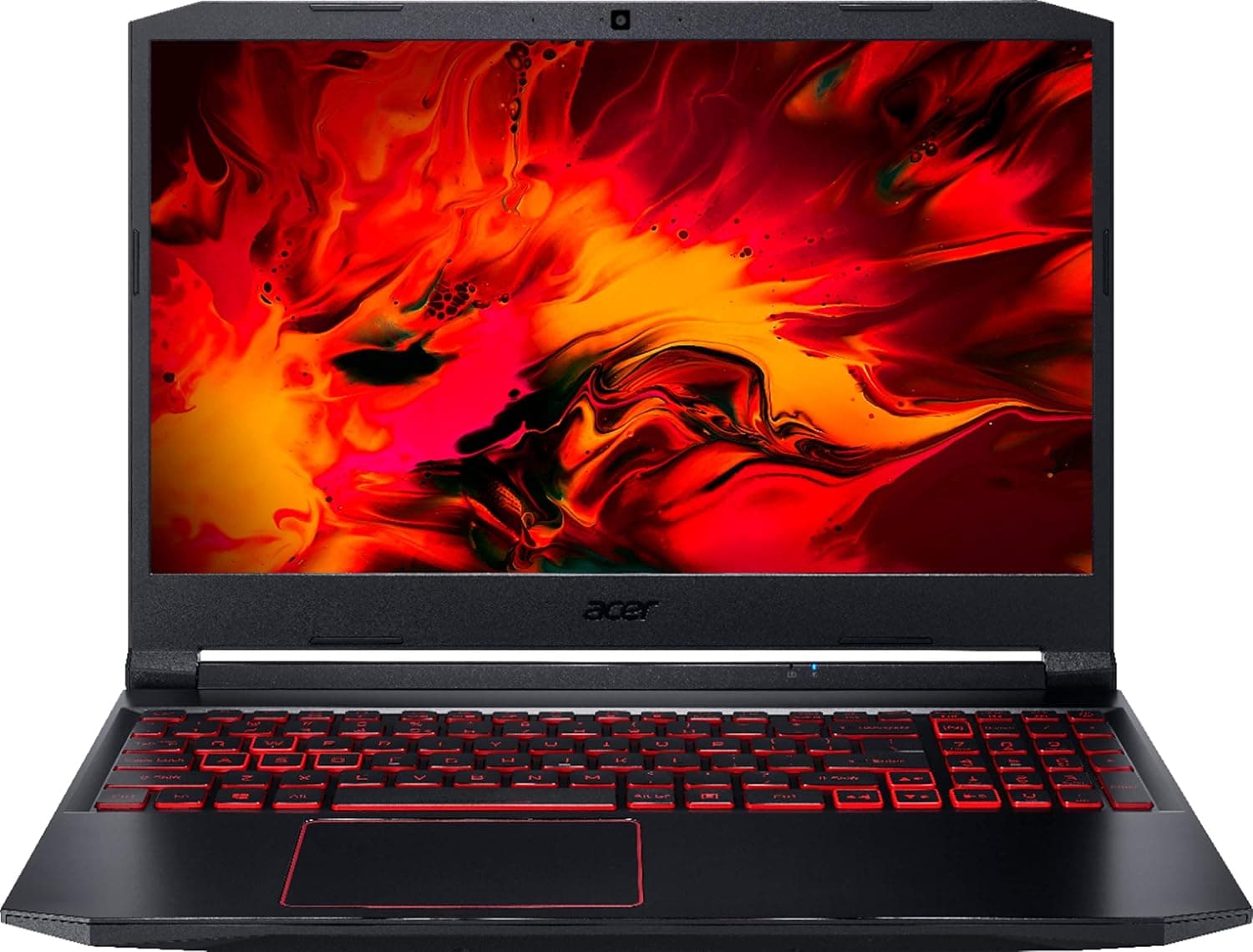
The acer Nitro 5 15.6-inch FHD laptop belongs to Acer's entry-level gaming line.
Where the higher-end Predator series spends its budget on cooling and panel quality, the Nitro 5 is built around a simpler premise: deliver playable performance at 1080p and keep the price realistic. In short, it suits people who are happy gaming at Full HD and who will mostly use the machine on a desk rather than carrying it every day.
The defining trait of this line is configuration variance. The Nitro 5 name has covered both Intel Core H-series and AMD Ryzen H-series processors across several generations, paired with a range of GPU tiers.
As a result, statements like "a Nitro 5 performs roughly like this" carry almost no information. What matters is the exact model number and the individual spec sheet on the listing you are buying from — and this article is organised around how to read that.
As captured on 8 June 2026, the Amazon rating stood at 4.3 out of 5 (86% positive) from 12 reviews.
That is a respectable score, but 12 is a very small sample. A handful of good or bad units moves the average substantially, so treat it as weak evidence that there is no widespread defect — not as a primary buying signal.
Compatibility Guide
With laptops you cannot choose parts, so the real question is what you can add later. Nitro 5 chassis have traditionally allowed access to SO-DIMM memory slots and M.2 SSD slots by removing the bottom panel, commonly with two memory slots and two M.2 slots (one often left empty).
Soldered memory or a single M.2 slot is possible on some configurations, so verify the service documentation or listing details for your specific model number before planning an upgrade.
If you intend to use an external display, check the video outputs first. Gaming laptops in this class often provide HDMI alongside USB Type-C with DisplayPort Alt Mode; the latter lets a single dock carry video and peripherals.
Note that USB Power Delivery alone is usually not enough to run a gaming laptop under load — most still require the dedicated DC barrel connector. This is the most common stumbling block for dock-based setups.
On the software side, Windows 11 requires TPM 2.0 and Secure Boot, which is the dividing line between generations.
Recent Nitro 5 units ship with Windows 11 preinstalled, but confirm this if you are considering an older or used unit. Also note that Acer gaming laptops rely on a vendor utility such as NitroSense for fan curves and performance modes.
A clean OS install reverts fan behaviour to defaults and can run hotter than expected, so reinstall the vendor utility alongside the drivers.
Product Info
The prices available at the time of writing were ¥158,446 on Amazon, captured 12 June 2026, and $669.85 on eBay, captured 13 July 2026.
Both are point-in-time snapshots and move with sales, currency rates and stock. Note the substantial gap between them: it most likely reflects a used or refurbished unit versus new stock, or a different configuration (GPU tier, memory capacity).
Assuming the cheaper listing is the same machine is how people end up with something other than what they expected. Always confirm the current price and configuration on the listing itself.
One caveat about the data behind this article: the supplied spec sheet contained monitor-arm attributes (VESA patterns, weight capacity, desk thickness) that have nothing to do with a laptop. None of those figures are used here.
The same mix-up may be visible on the listing page, so please read the cautions below.
The display is, as the name states, a 15.6-inch Full HD (1920×1080) panel.
Nitro models have widely used IPS panels with elevated refresh rates, but the same "15.6-inch FHD" description has covered 60Hz, 144Hz and 165Hz options over the years.
If competitive shooters are your priority, the refresh-rate line on the listing is worth more attention than the price difference between SKUs.
How It Compares
Among 15–16 inch gaming laptops, the Nitro 5 occupies the "get the performance, accept the compromises" zone: build finish, acoustics and portability are where the savings come from. Predator Helios models invest in cooling and display quality, which shows up as better sustained performance from the same GPU.
ASUS TUF Gaming machines sit at a similar price point with a different emphasis on chassis rigidity and power design, making them the most natural cross-shop.
The decision comes down to two questions: is Full HD enough, and will you carry it? If you want QHD or higher, or need a sub-1.5kg machine for daily commuting, look above this class.
If the laptop lives on a desk and plays at 1080p, the gap to pricier models is smaller than the price difference suggests.
What Living With It Is Like
Fan noise and heat are the first things owners notice, without exception in this class. Packing high-TDP CPU and GPU silicon into a thin chassis means the fans will spin up hard under load — that is the design working, not a fault.
With a headset it is a non-issue; playing through the speakers or on voice chat, it is noticeable.
Battery life demands the same acceptance. Gaming laptops are engineered to deliver full performance on AC power, and typically apply power limits on battery that cut frame rates sharply.
Plan on using it plugged in for games and treat battery time as browsing and office work only.
Best Use Cases
- Gamers content with 1080p — this class offers the best value for medium-to-high settings at Full HD. The more firmly you can rule out 4K and QHD, the better the fit.
- Desk-based users — if it stays on a desk with an external monitor and keyboard, the weight and battery drawbacks barely surface.
- People who want to upgrade later — accessible memory and M.2 slots let you buy a modest configuration now and add capacity when you need it. Familiar territory if you have built a desktop.
- Non-gaming GPU workloads — video editing, 3D work or learning machine learning on a budget, where you need a discrete GPU but cannot justify workstation pricing.
Before You Buy
The most important warning first: the listing data for this product shows inconsistencies. The spec sheet supplied for this article included monitor-arm attributes (VESA 75×75mm / 100×100mm, an 11.3kg weight capacity, 10–75mm desk thickness) that cannot belong to a laptop.
That strongly suggests another product's metadata has been mixed into the listing. Since you will see the same page, check that the product title, the product photos and the manufacturer's model number all agree before ordering. Buying from the spec table alone is genuinely risky here.
Second, treat the prices as snapshots. They were captured in June and July 2026 and this article will not be updated.
Given the sizeable gap between the two sources, at least one is likely a different configuration or a used unit. Rather than comparing numbers, confirm that five things are stated explicitly — CPU, GPU, memory, storage and panel refresh rate — and avoid listings that omit them.
The review score needs discounting too. 4.3 stars reads well, but with only 12 reviews a few lucky units move the average.
It cannot speak to long-term reliability or unit variance; read it as "no concentrated complaints" and nothing more.
Who should skip it: anyone who wants to carry a laptop daily, work in a quiet room, or game for hours on battery. A 15.6-inch gaming laptop usually exceeds 2kg and comes with a bulky AC adapter.
If you plan to drive a high-resolution, high-refresh external monitor, the GPU tier will likely become the limit before the display does. If any of these describe you, rethink the budget split or look at a different class.
Finally, a short first-day checklist. Run Windows Update, install the vendor drivers and utility, and update the GPU driver from the official site — factory images are often well behind and that can cost both performance and stability in some games.
If you intend to upgrade the memory or SSD, ask the retailer beforehand whether opening the bottom panel affects the warranty.
FAQ
Q. Does the Nitro 5 name mean consistent performance? A.
No. It spans many generations and configurations with different CPU and GPU tiers.
Judge by the model number and the individual spec sheet, not the series name.
Q. Can I add memory or an SSD myself? A.
Nitro 5 chassis generally expose memory and M.2 slots under the bottom panel, but slot count and free slots vary by configuration.
Check the specs for your exact model, and confirm warranty terms with the retailer.
Q. Can I buy it at the price listed here? A.
The figures above were captured between June and July 2026. Prices change, so confirm the current price and configuration on the listing before buying.
Q. Does it game well on battery? A.
Generally no — gaming laptops apply power limits on battery and lose significant performance. Plan to play plugged in.
Q. Can I use an external monitor? A.
It depends on the configuration, but HDMI plus USB Type-C video output is common. If you want a dock, verify Type-C video support and how the machine takes power first.
Product Disclosure (Amazon)
- ASIN: B08DCT2V6L
- Note: This article covers a manufacturer-made product based on Amazon listing details.