This article covers Wavlink USBC デュアル5Kユニバーサルドッキングステーション USB C PCドック(Thunderbolt 3)4xDP.
Overview
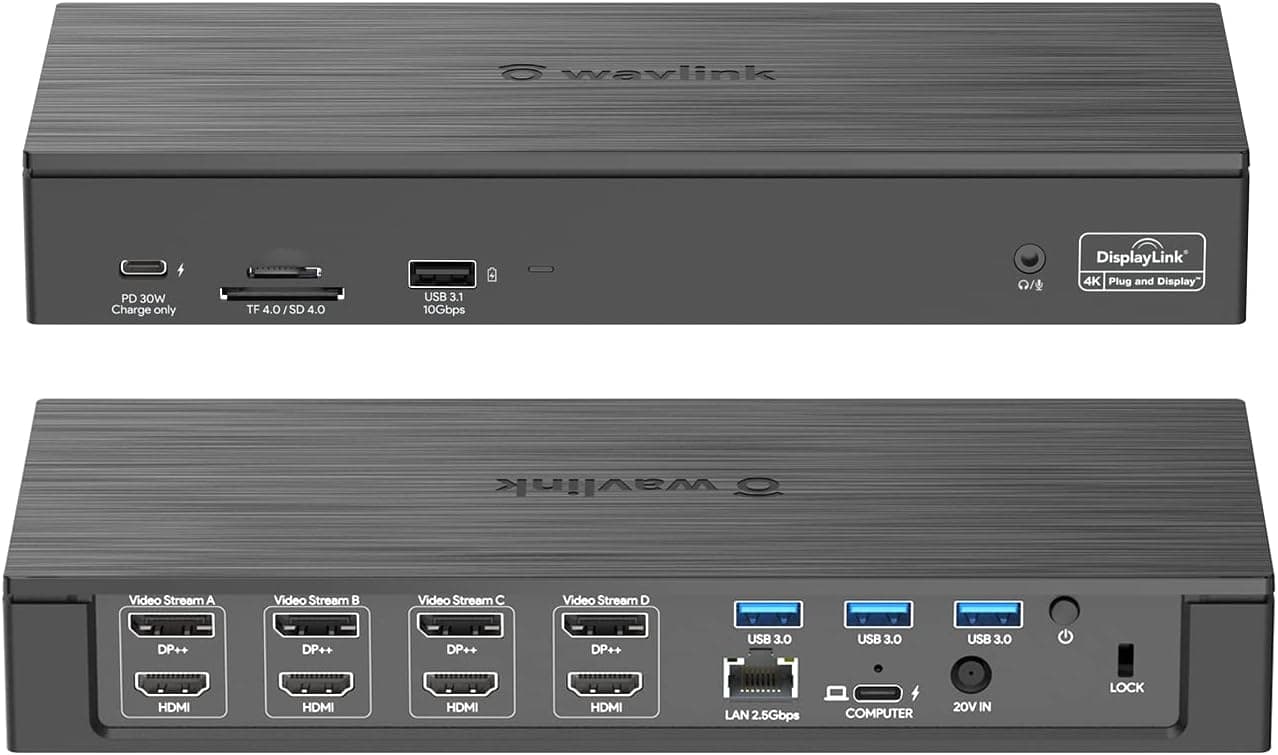
The Wavlink USBC Dual 5K Universal Docking Station is an 18-in-1 USB-C dock powered by DisplayLink technology. It can drive up to four external displays at 5K (5120×1440) @60Hz simultaneously, making it a compelling choice for users who need an expansive multi-monitor setup. This dock packs four DisplayPort++ and four HDMI ports, along with 2.5Gbps Ethernet, three USB 3.0 ports, one USB 3.1 port, SD/TF card slots, an audio/mic combo jack, 100W PD pass-through charging for the host, and a front-facing 30W PD charging-only USB-C port. The included 180W power adapter ensures both the laptop and connected peripherals receive stable power through a single USB-C cable.
Connectivity & Compatibility
The host connection uses USB-C with Thunderbolt 3 compatibility. Supported operating systems include Windows 7/8/8.1/10/11, macOS 10.8 through 12.x and later, Chrome OS, Android, and Ubuntu. However, the DisplayLink driver must be installed before all features—especially video output—will work. A key limitation: within each video stream group, only one port (either DP++ or HDMI) can be active at a time. Achieving 5K resolution also requires the latest DisplayLink driver and a compatible display. The front USB-C port is for PD 30W charging only and does not support data transfer. For data, use the rear USB-A ports (three at 5Gbps, one at 10Gbps).
Product Info
Released around 2022, the Wavlink USBC Dual 5K Universal Docking Station sits in the mid-to-high tier of USB-C docks. Its standout feature is the 18-port array with DisplayLink multi-monitor support. The street price is approximately ¥35,000 (around $240 USD). The package includes a 180W AC adapter, a USB-C cable, and a quick-start guide. Warranty is typically one year from the manufacturer. Compared to simpler USB-C hubs without DisplayLink, this dock offers far more video outputs. It is also more affordable than Thunderbolt 4 docks while still providing robust multi-display capabilities.
Best Use Cases
Creative professionals and designers: Photographers and video editors who need multiple monitors for timelines and previews. The SD/TF card reader supports up to 312MB/s, making RAW file imports fast and efficient. Traders and financial analysts: Those who monitor stock charts, news feeds, and data dashboards across four or more screens. The 5K resolution support maximizes on-screen information density. * Remote workers: Anyone who wants to turn a single laptop into a full dual- or triple-monitor workstation at home. The 100W PD charging keeps the desk tidy with just one cable. Competitive gamers should look elsewhere, as DisplayLink introduces slight input lag that can be noticeable in fast-paced titles.
Things to Consider
Remember that the DisplayLink driver is mandatory. The initial setup requires downloading and installing the driver from the official website, which adds a small step compared to plug-and-play docks. macOS users should verify compatibility with their specific OS version, as some releases have had intermittent issues with DisplayLink. The front USB-C port is charging-only—do not expect data transfer through it. If you plan to run four or more high-resolution displays, ensure your laptop's USB-C port offers sufficient bandwidth (Thunderbolt 3 or higher recommended). A USB 3.2 Gen 1 (5Gbps) port may struggle with multi-monitor performance at high resolutions.
Product Disclosure (Amazon)
- Manufacturer: WAVLINK
- Seller: Wavlink direct store
- Fulfilled by: Amazon
- ASIN: B09ZQTJGQ9
- Note: This article covers a manufacturer-made product based on Amazon listing details.