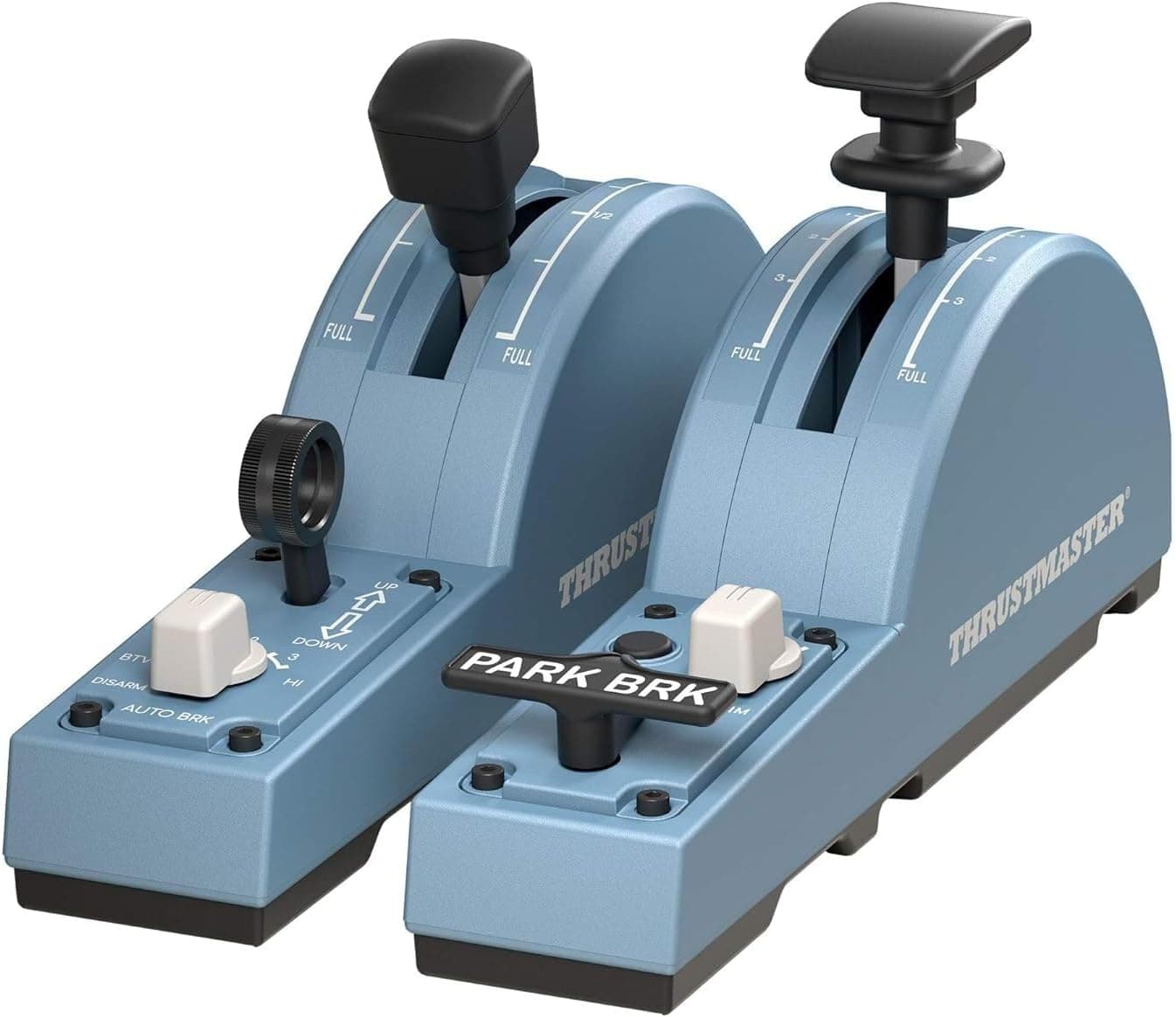
The Thrustmaster TCA Quadrant Add-On Airbus Edition (PC) is an expansion module for people who already own the TCA Quadrant Airbus Edition and want one more layer of physical controls. As long as you understand that it does not work on its own, it is one of the better value upgrades in Airbus-focused flight simming.
Overview
This product attaches to the Thrustmaster TCA Quadrant Airbus Edition (sold separately) and expands it. Rather than adding more throttle levers, it moves the non-throttle levers — flaps, speed brake, trim, landing gear — off the keyboard and onto dedicated hardware.
That framing makes its role clear.
On paper it offers two analog axes using magnetic sensors, ten programmable buttons and five virtual buttons. Ten non-slip feet on the underside keep the unit planted when you pull a lever one-handed.
Non-contact magnetic sensing generally avoids the wear-related drift that affects potentiometer-based axes, which suits Airbus operations where flaps are cycled on every departure and approach.
For reference, review data captured on June 9, 2026 shows 367 total reviews with a 4.6-out-of-5 rating (92% positive equivalent).
With 367 reviews behind it, the score is unlikely to be a small-sample artifact.
Compatibility Guide
The most important point first: this module does not work standalone. It connects to the expansion port on the Thrustmaster TCA Quadrant Airbus Edition (sold separately).
Without the base unit, the add-on does nothing. Some listings omit "Add-On" from the title, so confirm the base model before ordering.
| Item | Detail |
|---|---|
| Required base unit | Thrustmaster TCA Quadrant Airbus Edition |
| Analog axes | 2 (magnetic sensors) |
| Programmable buttons | 10 |
| Virtual buttons | 5 |
| Pedal compatibility | T.Flight Rudder (TFRP) / Pendular Rudder (TPR) |
| Non-slip feet | 10 |
TFRP and PR pedal sets are supported through the base unit, so you can build a throttle + lever bank + rudder setup. Everything reaches the PC over a single USB cable from the base unit, so you do not spend extra USB ports.
The platform is Windows PC, where the hardware appears as a standard game controller.
Physical space matters too. The add-on sits alongside the base unit, roughly doubling the desk width the quadrant occupies.
If you keep a keyboard and mouse on the same desk, a full set can leave no room for a yoke or stick. Measure your base unit and confirm you can fit another unit's width beside it before buying.
Product Info
The module was released on May 26, 2021. The box contains only the module and a quick-start guide; the TCA Quadrant Airbus Edition base unit must be purchased separately.
Manufacturer warranty is two years, subject to the retailer's terms.
On pricing, the timestamp matters. A marketplace listing (eBay US) showed $109.99 as captured on July 13, 2026 in USD.
The original Japanese article recorded a reference figure of about ¥22,998, but that was a launch-era reference price and may differ substantially from current street pricing. Flight sim peripherals swing hard with stock levels and sales, so always check the current price on the product page.
Overseas marketplace listings in particular land well above the sticker once shipping, duties and exchange rates are added.
One practical caveat when reading prices: the base unit, the add-on, and bundles of both are often sold under near-identical names, and it is easy to mistake a bundle price for the add-on price. If the figure looks equal to or higher than the base unit, suspect a bundle or an overpriced listing.
How It Actually Gets Used (Assignment Strategy)
The value here comes less from the spec sheet than from which controls you can move off the keyboard. In Airbus operations, the high-frequency candidates are:
- Flaps: staged every departure and approach; a physical lever means no glance away.
- Speed brake: used for fine descent-rate control, arguably the best use of an analog axis.
- Trim / pitch trim: touched constantly during hand-flying.
- Landing gear: low frequency, high cost when you get it wrong — worth a fixed position.
- Parking brake / lights: pushed onto programmable buttons to cut keyboard trips.
How you split the two analog axes is a matter of taste. One axis each for flaps and speed brake is the obvious layout, but some aircraft add-ons implement detented flaps that are easier to drive from buttons than from a continuous axis.
Assignments are made in the simulator's control settings, and aircraft add-ons sometimes publish recommended profiles. Flying a few sectors with the default mapping before fine-tuning is the faster route in practice.
Alternatives and Comparison
There are three realistic alternatives. First, skip it and keep keyboard bindings — free, but fine speed-brake modulation on descent stays coarse.
Second, add a generic throttle quadrant — reusable across aircraft types, but not shaped for Airbus layouts. Third, this module, whose differentiators are the Airbus-oriented lever shapes and the physical integration with the base unit.
The flip side: if you mostly fly Boeing types or general aviation aircraft, the Airbus layout is not an advantage. A generic multi-engine quadrant may serve you better.
The decision splits cleanly on whether Airbus flying is your main activity.
Best Use Cases
The strongest fit is someone who already owns the TCA Quadrant Airbus Edition and flies Airbus aircraft in Microsoft Flight Simulator or X-Plane. Moving flaps and speed brake from keyboard to levers noticeably changes precision and immersion in the approach phase.
It also suits people building toward a fuller cockpit over time. Support for TFRP and TPR pedals means a clear upgrade path from throttle to levers to rudder.
If you are new to flight simming and still assembling a first setup, prioritize the base unit and rudder pedals — they move the experience further. This add-on is a refinement after the fundamentals are in place.
Things to Check Before Buying
1. The base-unit trap. Again: it does not work alone.
Product names are long, and "TCA Quadrant Airbus Edition" and "TCA Quadrant Add-On Airbus Edition" sit side by side in search results. Discovering there is no connector after unboxing is a common outcome.
2. Listing metadata can disagree with the product. The captured pricing here came from a single overseas marketplace entry at $109.99 (captured July 13, 2026).
On such pages, metadata for the base unit and the add-on — manufacturer, model number, ASIN, images — sometimes gets mixed. Confirm from both the photos and the title whether you are buying the two-lever add-on module or a bundle including the base.
Price alone will mislead you.
3. Only two axes. This does not replicate an entire Airbus overhead panel.
It physicalizes part of the lever bank; systems switches stay on mouse and keyboard. Buying it expecting a full cockpit sets the wrong expectation.
4. Desk width and cable routing. As noted, the footprint roughly doubles.
If you plan to clamp the setup, desk depth and under-table bracing can prevent a solid mount.
5. Used and parallel-import condition. Marketplace listings include used and opened items.
Magnetic axes resist wear, but lever mechanisms and cables still age. If warranty coverage matters, buy through official domestic distribution.
FAQ
Q. Can I use this on its own? A.
No. The Thrustmaster TCA Quadrant Airbus Edition (sold separately) is required; the add-on connects to its expansion port.
Q. Do I need another USB port?
A. No. It connects through the base unit, so the PC still sees a single USB cable.
Q. Does it work with rudder pedals? A.
Yes — T.Flight Rudder Pedals (TFRP) and Pendular Rudder (TPR) are supported, allowing a throttle/lever/rudder setup.
Q. Can I use it for Boeing or GA aircraft? A.
Assignments are free-form, so yes, but the lever shapes follow Airbus conventions. A generic quadrant may satisfy you more if Airbus is not your focus.
Q. How is it rated? A.
As captured on June 9, 2026: 4.6 out of 5 across 367 reviews (92% positive equivalent).
Note that some reviews come from buyers who missed the base-unit requirement, so read the text, not just the score.
Q. What does it cost? A.
An overseas marketplace listing showed $109.99 as captured on July 13, 2026.
Pricing in this category moves a lot, so check the product page for the current figure.