Overview
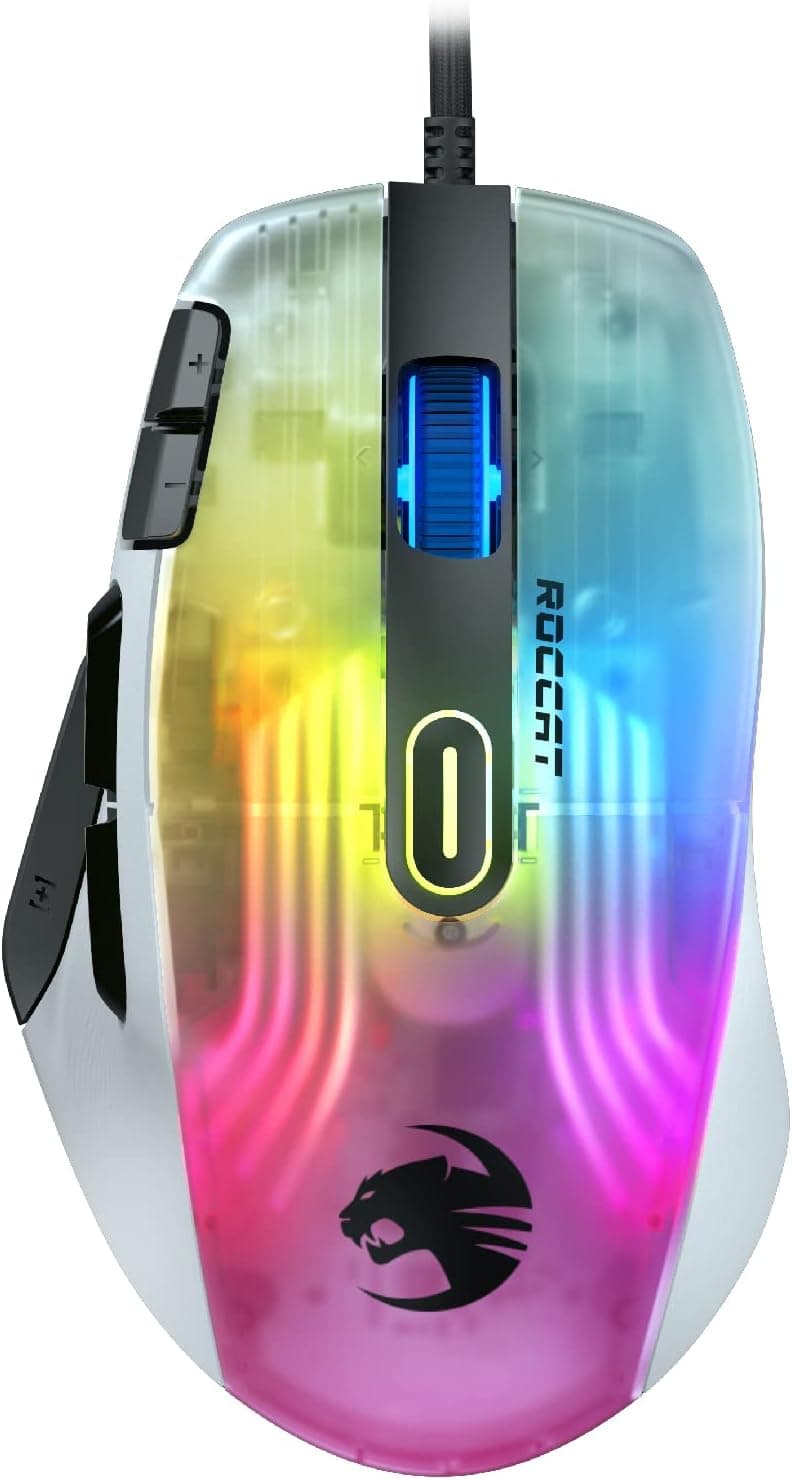
The ROCCAT Kone XP is a wired gaming mouse that packs a high button count and aggressive RGB lighting into one shell. The short verdict: it fits players who want to offload MMO/MOBA skills and macros onto the mouse, and anyone building a white RGB desk.
It does not fit competitive FPS players chasing the lightest possible aim tool — at 104g, it is not a lightweight mouse by today's standards.
By the numbers: a ROCCAT Owl-Eye 19K optical sensor rated to 19,000 DPI, Titan Switch Optical switches rated for 100 million clicks, and a 1000Hz (Ultrapolling) polling rate. There are 15 input paths — 12 physical buttons plus Easy-Shift[+], the 4D Krystal wheel click and wheel scroll — and layering Easy-Shift[+] on top yields 29 assignable commands.
The 1.8m PhantomFlex cable and heat-treated PTFE glides keep cable drag low for a wired mouse.
Spec Sheet and What It Actually Means
| Item | Value | Practical meaning |
|---|---|---|
| Sensor | ROCCAT Owl-Eye 19K optical | Real-world use sits at 800–1600 DPI; 19,000 is a ceiling, not a setting |
| Max DPI | 19,000 | Headroom for 4K displays and high-sens players; irrelevant to low-sens users |
| Switch | Titan Switch Optical (100M) | Optical actuation structurally resists double-click failure |
| Buttons | 15 (12 + Easy-Shift[+] + 4D wheel click + scroll) | Enough to mirror an MMO skill bar; rewards time spent configuring |
| Weight | 104g (excl. cable) | Not in the lightweight class; suits planted, wrist-led movement |
| Dimensions | 126 × 75.9 × 39.9 mm | Full-size; roughly for hands measuring 17–19cm |
| Cable | 1.8m PhantomFlex | Flexible; usable without a bungee |
| Polling rate | 1000Hz | 1ms intervals; modest next to newer 4000/8000Hz mice |
Max DPI is the most misread number here. 19,000 DPI is a catalog ceiling, not a play setting, and sensor quality comes down to tracking accuracy, not headline numbers.
What actually decides this purchase is the button count, the switch type, and the weight.
Compatibility Guide
Connection is USB-A wired only — there is no wireless mode and no battery. Windows 7 or later and macOS are supported.
It works on desktops and laptops, but an ultrabook with only USB-C ports will need an adapter. Plug directly into a motherboard or laptop port rather than a cheap bus-powered hub; cursor jumps and DPI settings that refuse to apply are a classic hub-related symptom with feature-heavy mice.
Configuration runs through ROCCAT Swarm: button mapping, DPI steps, RGB, and Easy-Shift[+] layers. Note that utilities like this are typically Windows-first, and macOS feature parity varies by version — check the manufacturer's stated OS support before buying if a Mac is your main machine.
Storing a profile in onboard memory lets you carry settings to another PC without software.
At 126 × 75.9 × 39.9 mm this is a full-size shape.
It suits hands measuring roughly 17–19cm (wrist crease to middle fingertip) using palm or claw grip. If your hand is under 16cm, or you use a fingertip grip, you may not reach the side button cluster comfortably — which throws away half the reason to buy this mouse.
The asymmetric shape is right-hand only, so left-handed users should look elsewhere.
Product Info
rmation
As captured on 26 May 2026, Amazon.co.jp listed it at ¥17,485 (ASIN: B09RQ75723).
Gaming mice move in price constantly, so treat that as a snapshot and check the live product page before buying. The other reference source is an eBay search, where prices vary per listing and cannot be quoted as a fixed figure.
One inconsistency worth flagging: the price entry is labeled "Amazon US" while the link points to Amazon.co.jp and the currency is JPY.
The figure to trust is whatever the Japanese product page shows at the moment you look. Warranty handling also differs between parallel imports and official distributor stock, so check who the seller is.
On reception, Amazon.co.jp reviews stood at 4.1 out of 5 (82% favorable) across 170 reviews as of 26 May 2026.
A 4.1 means broadly satisfied buyers, not universal praise, and 170 reviews is a modest sample — the average is less precise than on best-sellers with tens of thousands of ratings.
Read the low-star reviews before deciding rather than trusting the average alone.
The Kone XP launched in April 2022 and sits in the mid-to-high tier. Purchased through the official Japanese distributor it carries a 2-year warranty, and the box includes the mouse, a quick-start guide, and stickers.
How It Compares
Three rival categories come up at this price:
- MMO button clusters — some rivals offer more physical buttons. The Kone XP instead keeps 12 physical buttons and adds a shift layer for 29 total commands, which is easier to memorize than a 12-key numeric grid.
- Lightweight wireless FPS mice — 50–60g symmetrical models beat it outright for aim-first play, but typically cut down to about six buttons, which is not enough for MMOs.
- Do-everything wireless flagships — more flexible, but heavier on price, weight, and charging chores.
Buy this one if you want wired simplicity, a high button count under ¥20,000, and white-plus-RGB looks. If none of those three apply, another mouse will serve you better.
Feel in Use
104g reads as heavy on paper, but it is the structural cost of many buttons plus 19 LEDs and 8 light guides. For low-sensitivity, arm-driven FPS aim, that weight becomes fatigue.
For wrist-led play, MMOs, MOBAs, and productivity, it reads as stability instead. The PhantomFlex cable and PTFE glides keep the tethered feel reasonably subdued for the price.
Optical switches avoid the contact wear that causes double-click failures, but the click feel differs from mechanical switches and is a matter of taste. Try one in person if you get the chance.
Best Use Cases
- MMO and MOBA players — move skills, potions, and target swaps onto the mouse and cut down pinky travel on the keyboard.
- Streamers and editors — 15 input paths make a strong shortcut and scene-switch surface.
- Anyone tired of charging — wired only means battery level never enters the picture.
- White RGB build owners — the transparent shell shows off the lighting best on this colorway.
- Larger hands, palm or claw grip — the 126mm full-size body fits naturally.
Before You Buy
104g is heavy by competitive FPS standards. This is the core compromise.
If you play low-sens Valorant or Apex, the same budget buys a ~60g mouse and you will be happier. "Many buttons and featherweight" does not exist at this price — decide which you need first.
Wired is permanent. The cable is flexible, but it is still a cable. If you want a clean desk or couch use, buy wireless from the start.
Fifteen buttons do nothing until you configure them. Expect to spend time in Swarm and days to weeks retraining your fingers.
Skip that and you have paid for a heavy mouse.
White with a clear shell shows dirt. Skin oils and long-term plastic discoloration are the standard trade-off for white peripherals.
Plan on regular cleaning.
Watch for listing inconsistencies. The pricing data behind this article was labeled "Amazon US" while linking to a Japanese page in yen.
Storefront metadata — manufacturer, color, model variant — genuinely does get mixed up sometimes. Open the product page and confirm from the image and title that you are buying the wired white Kone XP. The wireless Kone XP Air and the black model are different products; ASIN B09RQ75723 is the one covered here.
Polling tops out at 1000Hz. Newer mice advertise 4000Hz or 8000Hz.
Whether you can feel the difference is debated, but on a spec sheet this looks dated.
FAQ
Q. Can I use it as a dedicated FPS mouse? A.
For casual play, yes. For competitive play, a lighter mouse is the better tool — the limiter is the 104g weight, not the sensor or switches.
Q. Will it fit small hands? A.
126 × 75.9 × 39.9 mm is full-size.
Under about 16cm of hand length, or with a fingertip grip, the side buttons may be out of comfortable reach.
Q. Does it work on a Mac? A.
It functions as a mouse under macOS. Swarm's deeper configuration support varies by OS version, so confirm the listed OS support if full customization matters.
Q. Are there really 29 buttons? A.
No — 15 physical input paths, doubled through the Easy-Shift[+] secondary layer to 29 assignable commands.
Q. What does it cost? A.
¥17,485 on Amazon.co.jp as captured on 26 May 2026.
Sales and stock shift the price, so check the live listing.
Q. Why optical switches? A.
They avoid the physical contact wear that causes unintended double-clicks, and are rated for 100 million clicks — the longer you keep a mouse, the more that matters.