Overview
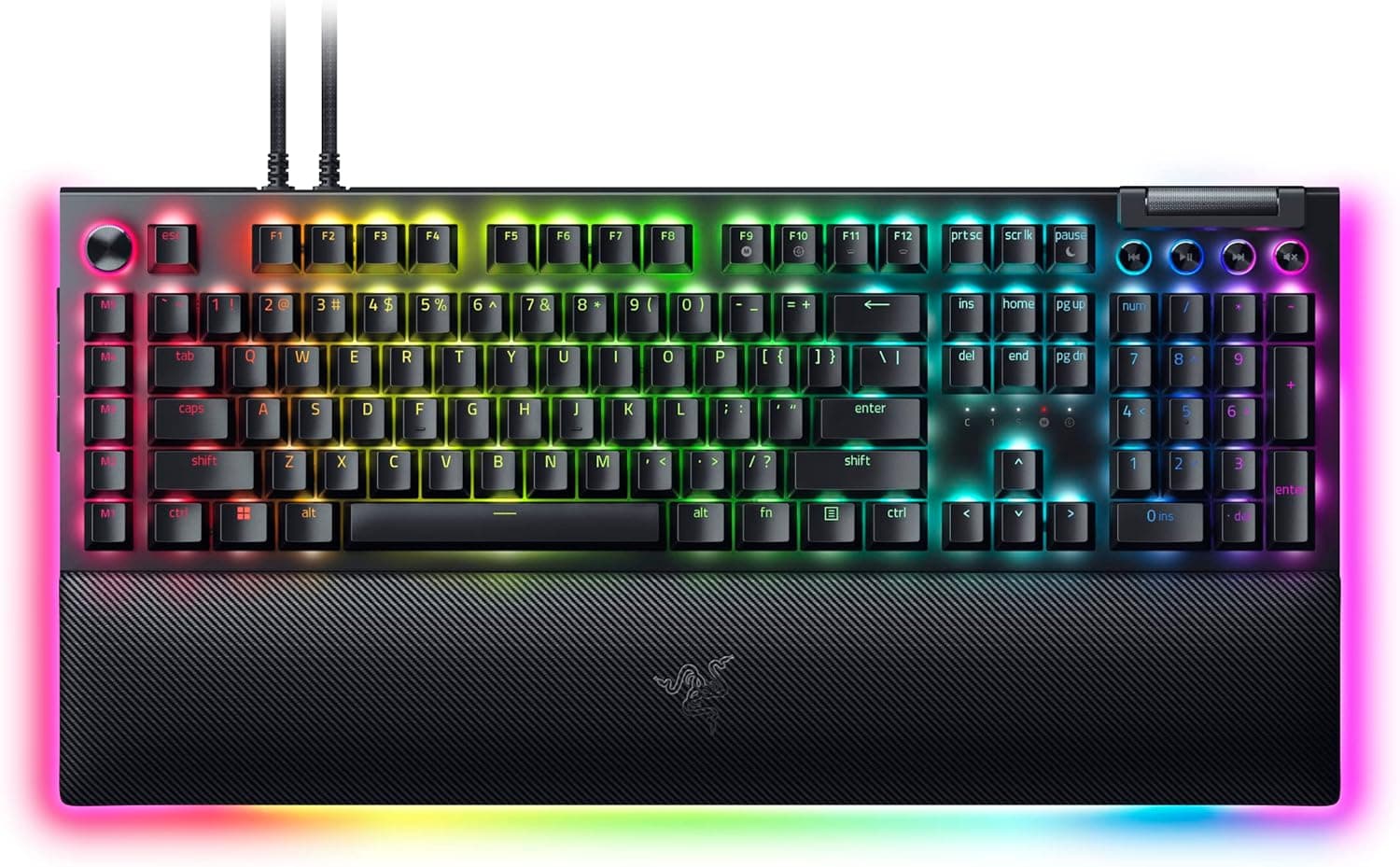
The Razer BlackWidow V4 Pro is a full-size wired mechanical keyboard with eight dedicated macro keys and a programmable Command Dial along its left edge. To put the conclusion first: this is not a board for people chasing the perfect typing feel — it is a board for people who have run out of keybinds and physical controls.
Quieter and better-feeling keyboards exist at this price, but few pack eight macro keys, a dial, a roller and four media keys into one chassis.
The ratings are steady. As captured on 30 May 2026, Amazon.co.jp listed 434 reviews averaging 4.2 out of 5 stars — 84% positive.
For a flagship that is a healthy distribution, not one dragged down by outliers. But 4.2 is not universal satisfaction: it reflects a real minority who could not live with the footprint and the wired-only design discussed below.
Pricing moved a lot between capture dates. Amazon.co.jp showed ¥37,433 as captured on 27 August 2026 and ¥47,230 for the same ASIN as captured on 30 May 2026.
eBay US showed $179.09 as captured on 8 July 2026.
A swing of nearly ¥10,000 in three months means there is almost no reason to buy this at full price in a hurry. All figures are point-in-time; check the product page for current pricing.
How to Read the Specs
| Item | Value | What it means in practice |
|---|---|---|
| Switch | Razer Yellow (linear, silent) | Fast repeats, but little sense of actuation |
| Keycaps | Doubleshot ABS | Legends never wear off; the plastic will shine over time |
| Lighting | Chroma RGB per key + three-sided underglow | Large glow area, very visible in a dark room |
| Macro keys | 8 dedicated + Command Dial | The core of the product. No value here, no reason to buy |
| Media | Multi-function roller + 4 media keys | Physical control instead of software sliders |
| Wrist rest | Magnetic leatherette (Chroma RGB) | Stays put, but adds depth on the desk |
| Connection | USB wired (Type-C) | No wireless mode |
| Layout | Full size with numpad | The widest possible footprint |
| Frame | Aluminium | Rigid, no flex under heavy typing |
| OS | Windows 10 or later | Synapse assumes Windows |
Read as a table, one thing stands out: every design decision here adds input surface. Numpad, macro column, dial, roller, media keys, wrist rest.
Each is useful on its own; together they claim a lot of desk. The wider your desk, the better this board gets — and the narrower it is, the more you will resent it.
Razer Yellow is a light, shallow linear switch, generally quoted at around 1.2 mm actuation and roughly 45 g of force (confirm exact figures on the product page).
Built-in dampeners make it quiet for a mechanical, but quiet is not silent — the switches soften, while the sound of an aluminium full-size chassis and its stabilisers remains.
Compatibility Guide
The supported OS is Windows 10 or later. All customisation runs through Razer Synapse: key remapping, macro recording, Command Dial assignments and Chroma profiles.
Without Synapse you still get normal typing and likely basic media control, but the macro keys and dial never deliver their value. If you plan to use this on a locked-down work machine where software installs are restricted, settle that question before buying.
For macOS and Linux, treat the board as unsupported — the stated OS requirement is Windows 10 or later. Basic HID typing often works, but with no Synapse, most of the reason to choose this specific keyboard disappears.
Mac-first users should look elsewhere.
Physical fit is a compatibility question too. On top of the full-size layout, the macro column extends to the left and the magnetic wrist rest extends toward you.
Full-size boards generally run about 44–46 cm wide, and this one adds the macro column on top of that. On a 60 cm desk, or on a keyboard tray, you may be left with no room to move a mouse. Measure the space you actually have alongside your current mousepad before ordering.
Connection is wired USB Type-C only, and two cables are supplied. On flagship boards a two-cable setup usually exists to feed a USB passthrough port, but confirm the configuration on the product page.
Either way, plan on two free USB ports on the PC side.
Product Info
Released in 2023, this is a high-end gaming keyboard carrying the standard 2-year manufacturer warranty. In the box: a magnetic leatherette wrist rest, two USB Type-C cables and Razer logo stickers.
The frame is aluminium and the keycaps are doubleshot ABS.
As noted, prices differ sharply by capture date: ¥37,433 on Amazon.co.jp as captured 27 August 2026, ¥47,230 as captured 30 May 2026, and $179.09 on eBay US as captured 8 July 2026.
A roughly 25% swing means the timing of your purchase materially changes how good the deal feels. High-end peripherals move most during large sale events, so if you are not in a rush, watching for a few weeks is worth it.
None of these figures represent the current price.
The review data — 434 reviews, 4.2 stars, 84% positive as captured 30 May 2026 — rests on a large enough sample to be meaningful.
This is not the familiar 'twelve reviews, 4.8 stars' pattern of a niche launch; it reads as a settled average.
Competitive Comparison
The real comparisons split into two groups. Within Razer itself, a 60% board like the Huntsman Mini is designed around the exact opposite priority: minimum desk footprint and maximum mouse room.
No macro keys, no numpad, no dial — but far more freedom in how you sit. If you arrived here because your desk is small, the axis to compare is size, not price.
The second group is hot-swap boards. A 75% or TKL hot-swap keyboard lets you change switches later and tune the feel over time.
The BlackWidow V4 Pro has fixed switches, so whether you like linear Yellows is decided at purchase. If you want a clear bump or click, look first at the Green-switch variant in the same family, or at a board with tactile options.
What this board wins on, decisively, is the sheer count of dedicated physical controls. Unlike layer-shifting schemes that simulate extra keys in software, dedicated keys cannot be mis-triggered and cost nothing to memorise.
For MMO rotations, stream scene switching or video-edit scrubbing, that difference is directly practical if you have more than eight things you want to hit without looking.
Setup Notes
Start with macro layout in Synapse. Having eight keys does not mean filling all eight — assign three or four at first and let your hand learn where they are. The left column sits outboard of the little finger and needs deliberate movement mid-game; over-assigning just creates keys you never press.
The Command Dial earns its keep on anything other than volume: brush size, timeline scrubbing, app switching — values you want to change continuously. Volume already has the roller and dedicated media keys, so mapping the dial there wastes it.
As for RGB, the loud presets are fun at first, but lower brightness and a single colour last longer. The three-sided underglow throws more light than you expect in a dark room, and on a white desk it can tint what your stream camera sees.
Best Use Cases
First, MMO and MOBA players who are chronically short on binds — eight dedicated macro keys are a direct fix. Second, streamers and editors, who can offload scene switching, mute and timeline control onto physical keys and a dial instead of buying a separate macro pad.
Third, anyone who needs a numpad, where the same desk serves spreadsheets and games. Fourth, users building a Razer desk, since Chroma sync between Razer peripherals is genuinely well executed.
Finally, latency-minded players: wired-only is an advantage here — no battery level to watch, no 2.4 GHz dongle quirks.
Things to Consider
The footprint is the big trap. Full-size layout, plus a macro column on the left, plus a wrist rest in front, takes more width and depth than people picture.
Low-sensitivity FPS players who sweep the mouse widely often find the space gone the moment a full-size board lands on the desk. Discovering your mousepad no longer fits is the single most common regret with keyboards like this.
There is no wireless mode. If you want a clean desk, or you pack the keyboard away between sessions, two cables become a quiet daily annoyance.
Check the underside cable routing in the product photos first.
Do not over-read 'silent'. Dampened linears are quiet for a mechanical, but they are not comparable to a truly silent membrane or capacitive board when you are on a call or sharing a room at night.
Office suitability usually hinges on the low resonance of the aluminium chassis rather than the switch noise itself.
Linear means no tactile feedback. If you type more than you game and want to feel the actuation, try a clicky Green-switch model or a tactile board before committing.
Software cannot fix this.
Confirm the layout (JIS or ANSI) from the product page images. Variants of the same model are commonly sold side by side, and the listing title alone may not tell you which one you are getting.
One note on the sales channel: on this listing, the seller and shipper are a third-party merchant rather than the manufacturer or Amazon itself (as captured). That is not unusual, but confirm warranty eligibility, whether the unit is domestic retail stock, and who handles DOA replacements before ordering.
Separately, manufacturer names, model numbers and accessory details registered on Amazon listings occasionally carry over from a different product. Verify the product from the images and title rather than trusting the registered metadata strings.
FAQ
Q. Does it work without Razer Synapse? A.
Normal typing works fine. Macro assignments, Command Dial functions and Chroma customisation all require Synapse — without it, most of this board's advantage is lost.
Q. Can I use it on a Mac? A.
The stated OS support is Windows 10 or later. Basic input may work, but it is outside supported use and you cannot configure it via Synapse.
Q. Is it quiet enough for an office? A.
Quiet for a mechanical, but not silent. It will be picked up in a quiet office or on a call.
Listen to typing-sound videos before using it in a shared space.
Q. Can I replace the keycaps? A.
The stock caps are doubleshot ABS. Check switch-stem compatibility and the full-size specific key sizes (right Shift, spacebar width) against the compatibility chart of any set you plan to buy.
Q. When is the right time to buy? A.
Captures showed ¥47,230 on 30 May 2026 and ¥37,433 on 27 August 2026. If you are not in a hurry, that swing justifies waiting for a major sale.
Always check the current price on the product page.
Q. Can the wrist rest be removed? A.
Yes, it is magnetic. On shallow desks you can run without it, though a palm rest matched to the board's height keeps your wrist angle more stable.
Product Disclosure (Amazon)
- Manufacturer: Razer(レイザー)
- Seller: Coeur à Coeur!
- Fulfilled by: Coeur à Coeur!
- ASIN: B0BV4BC7LV
- Note: This article covers a manufacturer-made product based on Amazon listing details.