Overview
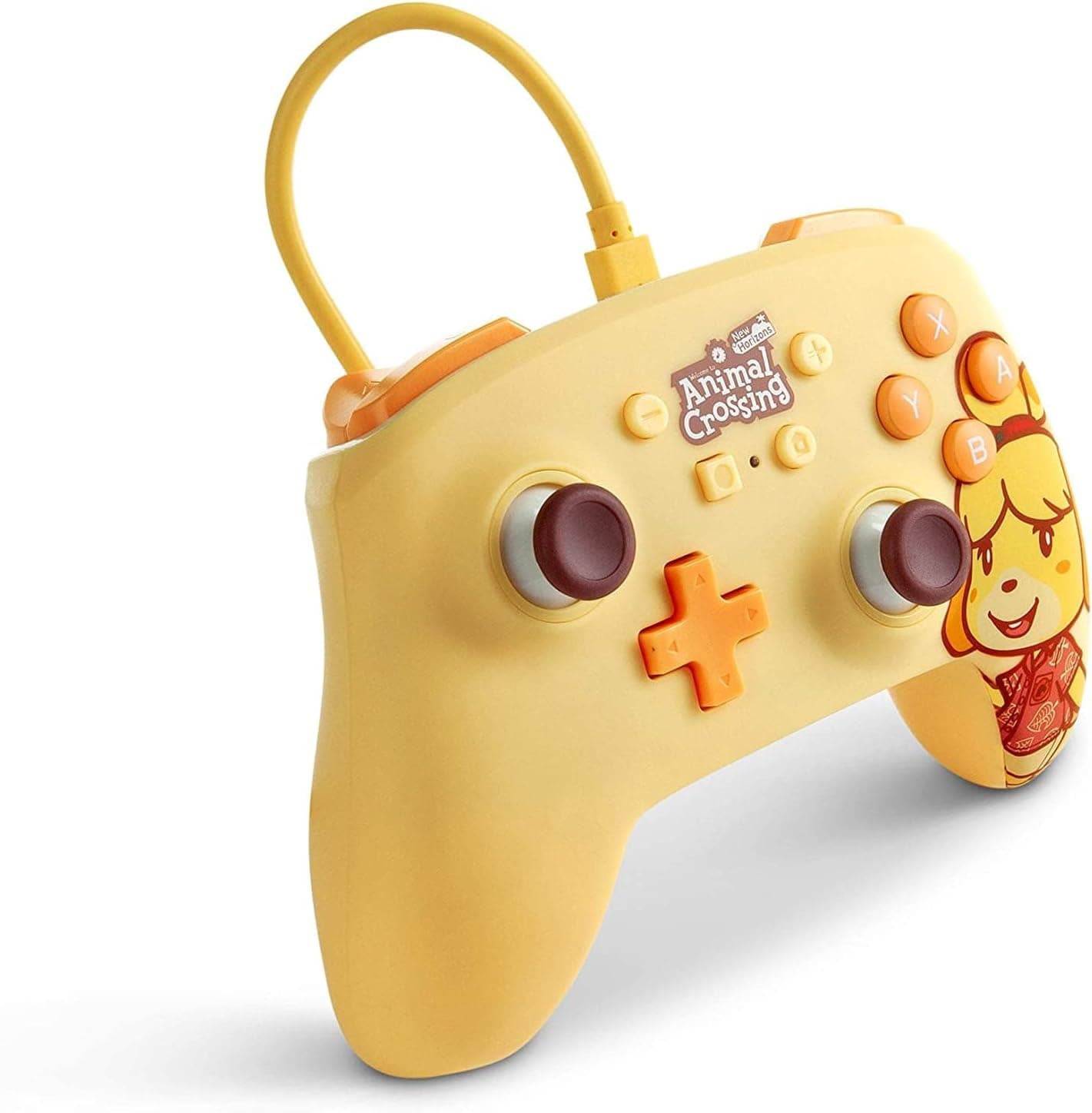
The PowerA Enhanced Wired Controller in Animal Crossing Isabelle trim is an officially licensed USB wired gamepad for Nintendo Switch. The short verdict: it suits people who find Joy-Con too small but do not want to pay Pro Controller money, and who play docked long enough that battery management is an annoyance.
If you need HD Rumble, motion controls, amiibo (NFC) scanning, or wireless, this pad is off your list before price ever enters the conversation.
The reception is steady. On Amazon.co.jp, as captured on 31 May 2026, it showed 869 reviews at 4.6 out of 5 stars (roughly a 92% positive score).
That combination of volume and rating suggests consistent everyday reliability rather than a handful of enthusiastic fans propping up the average.
Compatibility Guide
Supported hardware covers Nintendo Switch, Switch Lite, and Switch OLED. Connection is USB wired, the cable runs about 3 m, and the pad weighs about 200 g.
Three metres is generous for this class: it comfortably reaches a sofa 2 to 2.5 m from the TV.
On a desk it will be far too much cable, so plan on a hook-and-loop strap to keep it tidy.
The real stumbling block is where you plug it in. Wired pads are designed around the USB ports on the dock.
In handheld mode, or on a Switch Lite, the console-side connector may require an adapter or hub. "Compatible with all models" means a working configuration exists for each model, not that every model accepts the cable directly.
If Lite or handheld use is your main plan, check the product page and your console's port before buying.
There is also a console setting. Wired controllers may require the wired-communication option under Controllers and Sensors in System Settings to be enabled.
Most "it does not respond" or "the dock will not see it" reports come down to that setting plus trying a different USB port on the dock. Try both before assuming a defective unit.
For PC, the honest phrasing is "it may be detected." The stated compatibility note says PC use is not officially supported.
Even where it works, button mapping and trigger handling vary by title, so do not buy this as a dual-purpose PC pad.
Product Info
Key specs: USB wired connection, roughly 3 m cable, 3.5 mm headphone jack, two programmable back buttons, turbo function, about 200 g, and support for Switch, Switch Lite, and Switch OLED.
The official Pro Controller sits near 246 g, so this pad is a little lighter and easier on the wrists over long sessions. Whether that lightness reads as "less fatiguing" or "less substantial" is personal taste.
Two programmable back buttons are a genuinely useful inclusion at this tier. Moving jump or dodge to the back lets you keep your thumb on the stick while the camera moves.
Turbo helps in action and retro titles, but be aware that some online competitive games treat rapid-fire hardware as a grey area in their rules.
On price: the Amazon.co.jp listing showed ¥9,642 when captured on 31 May 2026, while the eBay listing showed $18.29 when captured on 16 July 2026.
Those two figures do not reconcile as the same product, even allowing for exchange rates and shipping. Limited themed editions can carry a premium once discontinued, but it is equally possible the data collection picked up a parallel-import or unrelated listing.
This article therefore treats both numbers as nothing more than what a given page displayed at a given moment. Always confirm the current price on the listing itself before buying; prices move often.
How It Compares
Switch pads split along clear lines. First, wireless or not.
Bluetooth options such as the 8BitDo Ultimate 2C or Pro 3 free you from the cable and work in handheld mode, at the cost of charge management and a fractional latency penalty.
Second, Hall effect sticks. Many recent pads use Hall effect sensors to resist stick drift.
This model makes no such claim. If drift is your top concern, choose a pad that explicitly advertises Hall effect sticks.
Third, the official Pro Controller. HD Rumble, motion controls, amiibo scanning, and wireless are all present there and absent here.
For gyro aiming in Splatoon, gyro puzzles in Zelda, or heavy amiibo use, this pad is not a substitute. That gap is about features, not price.
Real-World Notes
The 3.5 mm jack is the usual convenience of routing console audio through the pad while docked.
Voice chat, however, depends on the title and on the Nintendo Switch Online smartphone app, so a jack does not guarantee in-game voice chat everywhere. Check how your target game handles chat first.
Back-button assignment on pads like this is typically done on the controller itself. Follow the manual for saving and clearing assignments.
If you want per-game layouts, expect to redo it by hand each time, which gets tedious if you switch often.
Best Use Cases
Consider it if any of these fit. You love Animal Crossing and value the Isabelle design itself, since half the appeal of a themed pad is how it looks sitting on the desk.
You play only docked in front of a TV and want to skip charging and pairing entirely. You want a dependable second or third pad for local multiplayer with guests.
Or you want jump and dodge on back buttons so your thumb never leaves the stick. As a kid's pad it also has a practical edge: nothing to charge and nothing to lose behind the sofa.
Before You Buy
The biggest issue is what is missing: no HD Rumble, no motion controls, no amiibo scanning, no wireless. If even one of those matters, do not buy it.
Assuming "any Switch pad obviously has gyro" and then hitting a gyro-mandatory title is the classic third-party wired-pad mistake.
Second, do not assume the connection just works everywhere. As noted, handheld mode and Switch Lite may need an adapter.
"Works with Lite" does not tell you whether extra hardware is assumed; the product page does.
Third, the price data conflicts. Our captured figures show ¥9,642 on Amazon.co.jp (31 May 2026) against $18.29 on eBay (16 July 2026), a gap that cannot be explained for a single product.
The Amazon entry is also labelled "Amazon US" while linking to the Japanese storefront. Listing metadata and labels are sometimes wrong, so check the product images, title, and seller yourself to confirm you are buying the exact edition you want.
Themed pads often share a listing with other colourways.
Fourth, wired means physical constraints. Three metres is plenty, but cable on the floor gets stepped on, and repeated plugging wears the connector.
Decide on a permanent spot and leave it connected.
Finally, limited designs are often not restocked. Paying a scalper premium just because it is officially licensed usually delivers less satisfaction than buying a current model with better features.
FAQ
Q. Does it work with Switch Lite? A.
Lite is listed as supported, but a wired connection may require an adapter or hub. If Lite is your main use, confirm what else you need before buying.
Q. Does it support gyro / motion controls? A.
No. HD Rumble and amiibo scanning are also unsupported.
Skip it if gyro aiming is central to your games.
Q. How is latency versus wireless? A.
Wired avoids pairing issues and interference, so it is more consistent. Whether you can feel the difference depends on the title and on you.
Q. Can I use the 3.5 mm jack for voice chat? A.
The jack is there, but voice chat depends on the game and the Nintendo Switch Online app. Check your game's chat method first.
Q. It is not being detected. A.
Check the wired-communication setting under Controllers and Sensors, then try a different USB port on the dock. Most detection issues end there.
Q. Does it work on PC?
A. Not officially supported. It may be detected, but mapping is title-dependent, so do not choose it for PC use.