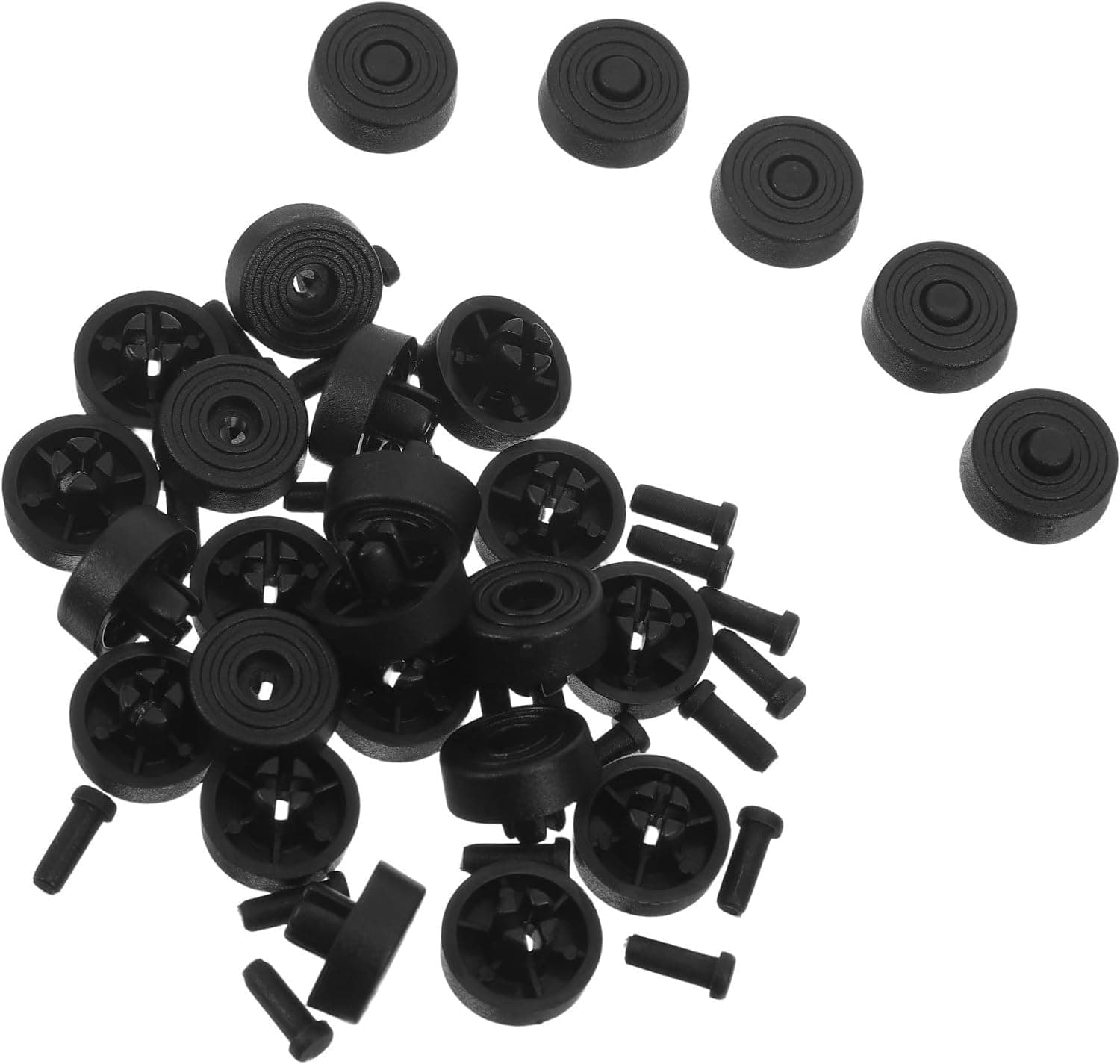
PC case feet are the kind of part you only notice once one goes missing. Lose a single foot and the chassis rocks, the side panel resonates, and a low hum travels straight into your desk or floor.
The JOYOFREELY 25-pack of snap-in replacement feet exists to fix exactly that, for pocket change.
Overview
The JOYOFREELY Black Plastic PC Case Replacement Feet are snap-in feet for cases with 5mm diameter holes in the bottom panel. They are plastic, black, and installed by pulling the old foot out and pushing the new one in — no tools, no adhesive.
This is not a performance part. Think of it as a repair item that addresses four specific symptoms: a missing foot, a case that slides, scratched flooring, and resonance-induced humming.
The most common failure with this category is dimensional, not qualitative. Whether 5mm matches your case is essentially the whole purchase decision.
Get that right and it is hard to be disappointed; skip the measurement and all 25 pieces become useless.
Compatibility Guide
The stated requirement is a 5mm opening in the case bottom — the diameter of the hole the peg slots into. ATX, MicroATX and Mini-ITX cases are all fair game, but form factor is not the compatibility criterion. Hole diameter is.
A full ATX tower with 6mm holes will not accept these; a Mini-ITX case with 5mm holes will.
Here is what to check, ordered by how often people get it wrong.
| Check | What to look at | Symptom if it doesn't match |
|---|---|---|
| Hole diameter | Measure with calipers or a ruler — is it exactly 5mm? | 4mm won't accept the peg; 6mm+ is loose and falls out |
| Mounting style | Push-in, screw-in, or adhesive? | Screw-in and stick-on cases can't use these |
| Panel thickness | Thick steel plus damping material | The clip may not engage on the far side |
| Foot count | 4 on typical towers, 6 on large ones | You'll use 4–6 of the 25 |
| Height | Shorter than the originals? | Reduced bottom-intake clearance for the PSU |
The reliable method is to pull one existing foot and measure its peg. Hole edges are often chamfered or burred and hard to read directly, while a removed peg can be judged with a plain ruler.
No calipers? Try a 5mm drill bit or the 5mm flat of a hex key.
The other easy miss is bottom-intake clearance. Most modern cases feed the PSU from below, and foot height is the intake gap.
Original feet of around 20mm are common, so swapping to shorter feet can choke the PSU and push its fan to higher RPM under load. The height of these feet isn't published, so compare the listing photos and dimensions against your existing feet before ordering — and weigh this more heavily if the PC sits on carpet.
What Actually Changes
"Noise dampening" is a vague claim, so let's set expectations. What plastic feet reduce is chassis vibration coupling into the floor or desk, where it gets amplified.
HDD seek noise, low-frequency fan imbalance, and side-panel buzz all depend heavily on how the case contacts its surface. Restoring a wobbling three-point stance to a stable four-point one often makes a hum disappear entirely.
What they cannot touch is equally clear. Fan turbulence, GPU coil whine, and a high-RPM air cooler are airborne noise, and feet do nothing about them.
If quiet operation is the goal, treat feet as step one of the foundation, not as a fix you'll hear on its own.
On the anti-slip side, the win is that the case stops creeping on laminate or a glass desktop — the small annoyance of the PC shifting every time you vacuum or adjust a monitor arm.
Installation
A few minutes, start to finish.
- Power down and unplug.
Before laying the case on its side, pick an orientation that doesn't strain AIO tubing. 2.
Pull each old foot straight out. If it's stuck, pry with a flat screwdriver through a cloth so you don't gouge the panel.
Clear any leftover rubber or adhesive from the hole — residue stops the new peg seating fully.
Push the new foot in vertically until the clip snaps home.
Angled pressure snaps pegs. 5.
Set the case on a flat floor and press diagonally opposite corners to confirm there's no rock.
Since the case is already on its side, pull the bottom dust filter and clean it. A clogged filter affects temperatures and noise more than the feet ever will.
Product Info
The published specs are six items: brand JOYOFREELY, black, plastic, 25 pieces, 5mm compatible opening, snap-in mounting. Height, peg length, load rating and hardness are not published, so for a heavy full tower, study the listing photos of the peg shape before committing.
Pricing on Amazon.co.jp was ¥522 for the 25-pack as captured on 24 May 2026 — roughly ¥21 per foot, about ¥84 for a typical four-foot tower.
Prices move, and this article won't, so confirm the current figure on the product page. Note that the dataset also lists an "Amazon US" entry showing the same ¥522 and pointing at the same Japanese listing; don't read it as an overseas price.
Twenty-five pieces looks excessive, but with this kind of part the value is having spares on hand, not the unit price. Feet harden with age and vanish one at a time during moves and cleaning.
With 21 in a drawer, the next loss costs no reorder and no shipping. For a household or office running several machines, the count is far from wasteful.
Alternatives
Worth knowing your options if 5mm doesn't match, or if you want stronger isolation.
- Adhesive anti-vibration pads — work regardless of holes, but leave residue and can creep under heavy cases.
- Screw-on case feet — the most secure fixing, but only for cases with threaded mounts.
- Audio isolation footers / rubber blocks — genuinely better damping, at several to dozens of times the price. Worth it for a many-drive NAS chassis.
- A rolling PC stand — the real answer if the machine moves often, though it's generally worse for vibration.
This product's position is simple: if the diameter matches, it's the cheapest and most reversible option available. If it doesn't, move down the list.
Best Use Cases
- Anyone with a missing foot — symptom and fix map one-to-one, and it beats hunting for an OEM spare on price and lead time.
- PCs on laminate or glass — addresses sliding and scratching at once.
- Multi-machine households and small-office IT — 25 pieces covers several systems' spares in one order.
- First-time builders — no tools and a few hundred yen at risk makes this a low-stakes first case mod.
- People refurbishing used cases — secondhand cases very often arrive with feet missing.
Things to Consider
Dimensional mismatch is the real risk. "Fits 5mm openings" also means it fits nothing else, and there is no industry standard for case foot holes.
4mm, 6mm and 8mm are all common, and plenty of cases use screws, rivets or adhesive rather than push-in pegs. Pull one existing foot and measure before ordering; skip that and all 25 pieces are scrap.
This is not a performance upgrade. Rigidity, airflow and cooling are unchanged.
Don't buy it expecting lower CPU or GPU temperatures. As noted above, shorter-than-original feet can actually restrict bottom intake and hurt cooling slightly.
The material is plastic. Against rubber or silicone feet, it gives up grip and damping.
For a heavy multi-drive chassis or a serious silent build, a softer compound will satisfy more. The flip side: hard plastic doesn't compress under load, so ride height stays consistent on heavy cases.
No load rating is published. On a 20kg-plus full tower with multiple radiators, each of four feet carries 5kg or more.
A thin plastic peg under that load may deform over time. For heavy builds, spread the load across six feet or look at metal or rubber alternatives.
Listing data can drift. Here the manufacturer is registered as JOYOFREELY while the seller and shipper are CqiaoKj.
That split is ordinary for accessories, but Amazon listings for this category do sometimes carry compatibility or dimension data that doesn't match the physical item. Before ordering, check the product photos for peg thickness and whether a retaining clip is visible, and confirm they're consistent with the "5mm" in the title.
A review from someone using your exact case is the most trustworthy compatibility source you'll find.
FAQ
Q. How do I confirm my case uses 5mm holes? A.
Pull one existing foot and measure the peg — that's the most reliable route. Without calipers, test the hole with a 5mm hex key or drill bit.
Case manuals almost never document foot hole diameter, so measuring is the default.
Q. What am I supposed to do with 25 pieces? A.
A typical tower uses four; a large case, six. Treat the rest as stock.
If you own several PCs or refurbish used cases, they get used eventually.
Q. Will this make my PC quieter? A.
It helps with low-frequency hum caused by chassis vibration coupling into the floor or desk. It does nothing for airborne noise like fan turbulence or coil whine.
Going from a wobbling case to a stable one is very audible; going from stable to stable is not.
Q. Do they help on carpet? A.
Less so — carpet already absorbs vibration. The bigger issue on carpet is feet sinking in and blocking bottom intake, where placing a board under the case helps more than changing feet.
Q. Are tools required? A.
No, they push in. A flat screwdriver helps lever out stubborn old feet; put a cloth under it to protect the panel.
Q. Can I use them on monitor stands or other gear? A.
Physically, yes, for any 5mm push-in hole. But these are specified for PC cases with no published load rating, so treat other uses as at your own risk.
Product Disclosure (Amazon)
- Manufacturer: JOYOFREELY
- Seller: CqiaoKj
- Fulfilled by: CqiaoKj
- ASIN: B0H2MVVFM8
- Note: This article covers a manufacturer-made product based on Amazon listing details.