Overview
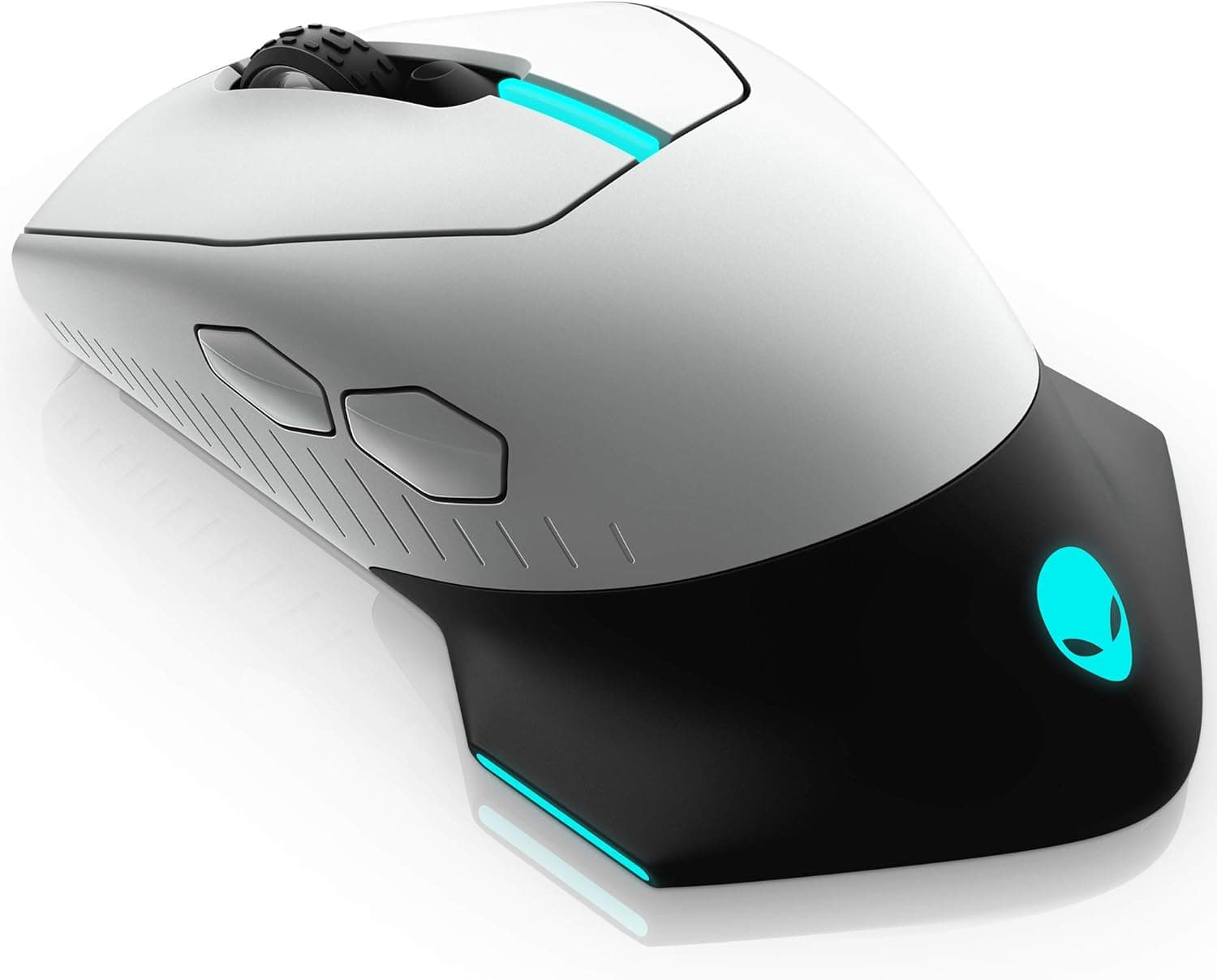
The Alienware AW610M, from Dell's gaming brand, is a dual-mode gaming mouse that works over both 2.4GHz wireless and a USB wired connection.
Its headline numbers are a 16,000 DPI sensor, a 1000Hz polling rate, seven fully programmable buttons, and a rated battery life of up to 350 hours — the last of which is what really sets it apart in this class. Put simply, this is a mouse for people who play for hours and don't want to think about charging, and for people who want several commands bound under their hand.
It is not the mouse to buy if you are shopping for the lightest possible FPS shell.
On Amazon.co.jp it holds a 4.1 out of 5 average across 212 reviews — an 82% positive score as of the May 2026 capture.
A 4.1 across a few hundred reviews is the classic "no dealbreakers, but not universally loved" distribution.
The sections below break down what sits behind that number.
Which Use Case Fits
| Use case | Fit | Why |
|---|---|---|
| MMO / MOBA / RPG | Good fit | All seven buttons are bindable; charging is rarely an interruption |
| Competitive FPS | Conditional | 1000Hz and 16,000 DPI are plenty, but weight and sensor generation trail newer lightweight mice |
| Work plus gaming | Good fit | Switch to wired and you never think about the battery |
| Travel / portable use | Weak fit | The receiver occupies a USB-A port, and the body isn't compact |
The verdict splits cleanly. The closer your usage sits to "long sessions, many buttons, desk-bound," the better this mouse looks.
The closer it sits to "light, portable, competitive," the more other options win. Decide which side you're on before comparing spec sheets.
Compatibility Guide
Supported operating systems are Windows 10 / 11 and macOS. Wireless operation uses the bundled 2.4GHz USB receiver, and wired mode uses a USB cable into the mouse itself.
That means environments built around Bluetooth — thin laptops without USB-A, tablets, some consoles — may not work out of the box. If your PC only has USB-C, budget for a USB-A adapter before you order.
Customization runs through the Alienware Command Center software, which handles button assignments, DPI stages, and RGB lighting. The important caveat is that this configuration software is a Windows-oriented tool.
Working as a mouse on macOS and being fully configurable on macOS are two different things. If a Mac is your main machine, plan for the possibility of configuring the mouse on a Windows PC first.
One practical note applies to every receiver-based mouse: plugging a 2.4GHz dongle next to a USB 3.0 port or a USB 3.0 external SSD can cause interference and cursor stutter.
If that happens, move the receiver to a different port, ideally onto an extension cable near the mouse. This is a property of the 2.4GHz band rather than a defect, and switching to wired mode eliminates it entirely — which is one of the real arguments for buying a dual-mode mouse at all.
Product Info
The core specifications are a 16,000 DPI sensor, a 1000Hz polling rate, up to 350 hours of battery life, seven programmable buttons, and 2.4GHz wireless plus USB wired connectivity.
The finish is Lunar Light (silver-white), which reads as classic Alienware but shows finger oils more readily than a black shell — plan on wiping it down.
Pricing was ¥12,100 on Amazon.co.jp as captured on 27 May 2026. Prices move constantly with stock and sales, so check the product page for the current figure before buying.
The same data set also lists $200.00 on eBay, but that is an order of magnitude out of line for this product class and most likely reflects a different listing or configuration, so this article does not treat that figure as a price reference.
The "up to 350 hours" claim is a rated figure. Turn on the RGB lighting or push settings harder and it will fall. Wireless mouse battery ratings are generally measured with lighting off and power-saving conditions.
Rather than expecting a month of runtime, read it as "with lighting off, you will rarely think about charging." And when it does run flat, plugging in the USB cable turns it into a wired mouse immediately — a genuinely reassuring property of this design.
Comparison With Rivals
The same price bracket includes multi-button wireless mice like the Logitech G502 Lightspeed, value-focused wireless options like the Razer Basilisk V3 X HyperSpeed, and MMO-oriented high-button-count mice like the Redragon M913 MAX. If raw button count is your priority, a dedicated MMO model with more side buttons wins outright.
On the single axis of "how rarely must I charge this," however, 350 rated hours remains a strong number.
Sensor generation deserves a calm look too. Newer flagships advertise 26,000 or 35,000 DPI, but most people actually play somewhere between 800 and 1600 DPI, and the headline maximum almost never translates into a felt difference.
What you feel is weight, shape, switch actuation, and how well the wireless stack is implemented. So don't worry that 16,000 DPI is insufficient — judge this mouse on whether the grip and weight suit your hand.
Best Use Cases
This mouse suits:
- Players with long daily sessions who don't want to track charge cycles. With lighting dialed back, the rated 350 hours means weeks between charges.
- MMO, MOBA, and RPG players who want commands under their hand. All seven buttons are programmable.
- Anyone who wants to switch between wired and wireless. Wired for tournaments, streaming, or noisy RF environments; wireless the rest of the time — one mouse covers both.
- Owners of other Alienware gear who want a consistent finish and a single configuration app.
- Buyers who value warranty support, since Dell's support channel applies. Confirm the exact terms for your purchase route before ordering.
Before You Buy
Start with the listing title. This product supports both wired and 2.4GHz wireless operation, yet some listings describe it only as "wired." Amazon product pages not infrequently carry registration details that disagree with the actual item, so verify against the product images, the model number, and the accessory list that you are buying the model you think you are (AW610M, Lunar Light). By the same logic, treat an unusually high listed price — such as the $200.00 figure noted earlier — as a different listing or a reseller markup rather than the real market price.
Accept the weight. Modern FPS-oriented mice cluster in the 50–70g range; the AW610M, with its battery and receiver-based design, is not in that category.
If you're coming from a featherweight mouse, flicking aim may feel different. Check the stated weight on the product page and compare it against whatever you use today.
Remember this is not a current-generation product. The AW610M is several years old, and Alienware has since released newer wireless models.
Software update cadence, availability of replacement parts such as skates and cables, and general stock stability all tend to be worse than for a current model — which matters most if you intend to use the same mouse for years.
Built-in batteries age. Lithium-ion capacity declines with charge cycles, so 350 hours describes a new unit.
Reduced runtime after a few years is normal, not a fault. The saving grace is that a weak battery doesn't retire this mouse — it just becomes a wired one.
If replaceable batteries matter to you, look at models that advertise that specifically.
Finally, the software. The value of seven buttons only materializes through Command Center, so if you avoid background utilities on principle, this isn't your mouse.
Check the spec sheet for onboard profile storage if you plan to move it between multiple PCs.
FAQ
Q. Is this a wired-only model? A.
No. The specifications list both 2.4GHz wireless and USB wired operation.
Even if a listing title says "wired," confirm via the spec sheet and images.
Q. What happens when the battery dies mid-game? A.
Plug in the USB cable and keep playing in wired mode. That's the main benefit of a dual-mode design.
Q. Does it work on a Mac? A.
macOS is listed as supported. Detailed customization through Alienware Command Center, however, assumes Windows, so plan to configure it there if you want precise bindings.
Q. Do I need 16,000 DPI? A.
Most players stay around 800–1600 DPI. Treat the maximum as headroom and choose based on weight, shape, and button layout.
Q. My cursor stutters occasionally. A.
A 2.4GHz receiver near USB 3.0 devices can suffer interference.
Try a different port, an extension cable near the mouse, or simply switch to wired mode.
Q. How much does it cost? A.
¥12,100 on Amazon.co.jp as captured on 27 May 2026.
Prices fluctuate, so always confirm on the product page.
Product Disclosure (Amazon)
- Manufacturer: Dell
- ASIN: B07X3CVMS8
- Note: This article covers a manufacturer-made product based on Amazon listing details.