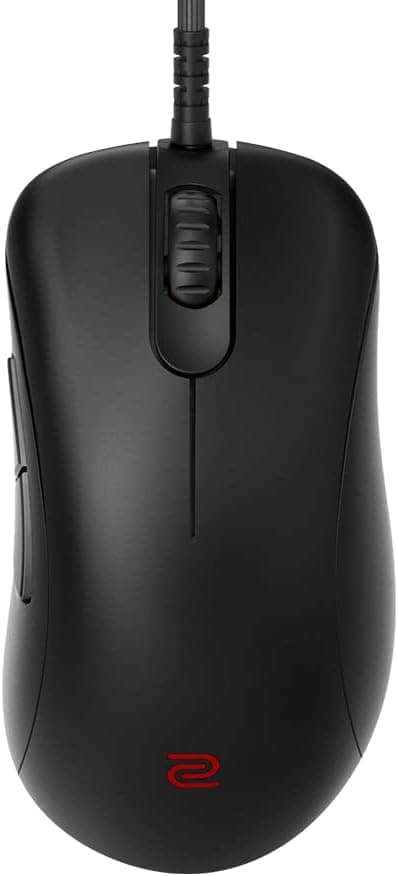
The BenQ Zowie EC2-C is a gaming mouse built by subtraction: a right-handed ergonomic shell, a wired cable, and almost nothing else. This article uses the published specs and Amazon rating data to work out which hand sizes and play styles it fits, and where you will have to compromise.
Overview
The BenQ Zowie EC2-C is a professional-grade gaming mouse designed for right-handed players. Its ergonomic shape, developed with top esports athletes, reduces hand fatigue during long sessions.
It uses a PixArt PMW3360 optical sensor with four DPI steps (400 / 800 / 1600 / 3200), a paracord cable for drag-free movement, and a 24-step scroll wheel with clearly defined notches. It is a medium (M) size shell suited to palm and claw grips.
Put simply, this mouse is for people who value "behaves the same way every time" over "lots of settings to tune." There is no software to install: DPI and polling rate live on onboard buttons, and the settings travel with the mouse.
If you want RGB, macros, or DPI in 100-step increments, this is not the product for you.
Where It Sits Among Competitors
The current market races in three directions at once: wireless, ultra-light, and ultra-high polling. Against 26,000 DPI, 4,000Hz, sub-60g rivals, the EC2-C sticks with 3,200 DPI, 1,000Hz, and a cable.
On paper that reads as dated, but real FPS players almost all sit between 400 and 1600 DPI, so the ceiling rarely matters in play. The EC2-C has simply stepped out of the spec race.
The real difference versus wireless is operational. Nothing to charge, no dongle to track, no battery to think about.
In exchange, poor cable routing makes even a paracord feel heavy, so a mouse bungee is effectively a prerequisite. Whether you accept that one extra step is the first fork in the decision.
| Aspect | EC2-C | Consider instead |
|---|---|---|
| Shape | Right-hand ergo, M size | Symmetric models (FK series) |
| Connection | Wired only | Wireless competitors |
| Sensor | PMW3360, 3200 DPI max | Newer high-DPI, high-polling sensors |
| Software | None needed, onboard | Software with macros and profiles |
The EC2-C wins on shape and predictability, not on numbers. If those do not matter to you, rivals at the same price will satisfy you more.
Compatibility Guide
The mouse connects over wired USB Type-A. It is recognized by Windows and macOS with no driver install.
Polling rate switches between 125, 500, and 1000Hz via a button on the underside, and DPI cycles through 400 / 800 / 1600 / 3200. Because settings are stored in the mouse, you can plug into a tournament PC or a friend's machine and start with your usual sensitivity.
The critical compatibility question is not with your PC but with your hand. An M-size ergo shell generally suits hands around 17-19cm in length using palm or claw grip, but treat that as a rough guide: finger length and palm thickness change the feel.
Larger hands should look at the EC1-class size, smaller hands at the EC3-class. Handling one in person is the fastest way to be sure.
As the manufacturer states, this is a right-hand-only design. Used left-handed, the thumb scoop lands under your pinky and the shape's advantage inverts into a drawback.
Left-handed players should look at symmetric models such as the FK series.
If your laptop only has USB Type-C, you will need an adapter or hub. Cheap hubs can make 1000Hz polling unstable, so prefer a direct USB-A port or a well-powered hub.
Product Info
The EC2-C arrived in late 2021 as the medium size in the C-series revision. It targets mid-to-high tier esports use, from professionals down to committed amateurs.
A spare set of mouse feet is included, so worn skates can be swapped immediately. The manufacturer provides a one-year limited warranty.
As captured on 25 May 2026, the price on Amazon.co.jp was ¥7,999.
Prices move, so check the product page for the current figure before buying. Note that the eBay listing captured at the same time ($127.02) is far above the street price for this class of mouse.
That could be import markup, a multi-pack, or simply the wrong listing, so this article does not treat it as a real market price. If you buy through an overseas marketplace, confirm the listing contents and quantity.
On ratings, as of 25 May 2026 the Amazon average was 4.3 out of 5 (roughly 86% positive) across 125 reviews.
That is not a blockbuster review count, but the level is steady. Shape-driven mice tend to attract low scores from people the shell did not fit, so a 4.3 suggests high satisfaction among those it did.
| Item | Value |
|---|---|
| Sensor | PixArt PMW3360 optical |
| DPI | 400 / 800 / 1600 / 3200 |
| Polling rate | 125 / 500 / 1000 Hz |
| Scroll wheel | 24 steps |
| Cable | Paracord, approx. 2m |
| Size | M (medium) |
| OS | Windows / macOS, no driver |
Setup and Everyday Feel
There is almost nothing to do out of the box. Plug it in, pick DPI and polling rate on the underside, match your in-game sensitivity, and you are done in under five minutes.
No installer, no account. That "nothing to configure" quality matters most if you move between machines.
The 24-step wheel gives distinct, well-separated notches. If you bind weapon slots to the wheel in an FPS, fewer accidental double-steps is a genuine benefit.
The flip side is long-document or web scrolling, where all those notches tire your finger. Worth picturing in advance if this will double as a work mouse.
The paracord is soft, but wired is still wired. A bungee, or simply routing the cable away behind the desk to remove tension, changes the feel dramatically.
Most complaints that "wired feels heavy" are really cable-routing complaints.
Best Use Cases
This mouse is at its best for right-handed players who take FPS and battle royale titles seriously. The straightforward PMW3360 tracking and light paracord make fine aim corrections easy to control.
If your hand is medium-sized and you use palm or claw grip, it belongs on your shortlist.
Because it needs no drivers, it also suits people who move between environments: LAN parties, tournament venues, shared PCs at school or work. Settings stay in the mouse, so any machine starts at your usual sensitivity.
One more fit: people who want to stop shopping for mice. If you would rather find a shape that works and keep it for years than chase every new release, this simple, low-failure design matches that habit well.
The bundled spare skates point in the same direction.
Before You Buy
The main pitfall is shape, not specs. Ergonomic shells are all-or-nothing: perfect if your hand fits, unfixable if it does not.
Buy without checking whether the M size suits you and you may end up reselling a mouse whose sensor and build you have no complaints about. Larger or smaller hands should compare the other sizes first.
Second, the feature cuts are real. There is no RGB, no macro support, and no software profile management.
DPI is four fixed steps, so no 100-increment fine tuning. Irrelevant if you run 800 DPI like most players, a clear shortfall if you insist on something like 1450.
The cable will also be a dealbreaker for some. If your desk is cramped or you simply do not want to manage routing, buy a wireless mouse and be happier.
Likewise, if you want 4,000Hz polling or a sub-60g body, this is not the product. 1000Hz and 3200 DPI are enough in practice but do not compete on a spec sheet.
Finally, watch where you buy. As noted, an overseas marketplace listing sat far off the street price.
Listings that are extremely high or extremely low are usually a different product, a parallel import, or a multi-pack, so do not buy on price alone. Store metadata (manufacturer, model number, size) also sometimes disagrees with the actual product.
When you open the page, confirm from the image and title that it is the EC2-C in M size. The EC1-C and EC3-C are different sizes and look very similar.
FAQ
Q. Do I need any software? A.
No. It is plug-and-play on Windows and macOS; DPI and polling rate are set with buttons on the underside and stored in the mouse.
Q. Can left-handed players use it? A.
It works physically, but the right-handed ergo shape makes it uncomfortable. Consider a symmetric model such as the FK series.
Q. Is 3200 DPI enough for high-resolution monitors? A.
For FPS play, 400-1600 DPI is the norm, so the ceiling is rarely an issue. For desktop work on a high-res display, adjust the OS pointer speed alongside it.
Q. How does it differ from the EC1-C and EC3-C? A.
Mainly size. The EC2-C is the medium; EC1 is larger and EC3 smaller.
The sensor and design philosophy are shared, so choose by hand size and grip.
Q. Does it work as a work mouse? A.
It can, but the 24-step wheel is tiring for long scrolls and there are only two side buttons. For browsing and spreadsheets, a general-purpose mouse may be more comfortable.
Q. What do I do when the skates wear out? A.
Start with the included spare feet. After that, first-party or aftermarket skates are available.
Product Disclosure (Amazon)
- Manufacturer: ベンキュージャパン
- ASIN: B09JRZZ4RV
- Note: This article covers a manufacturer-made product based on Amazon listing details.