Overview
The Acer Predator Helios Neo 16 PHN16-71-N76Z47 pairs an Intel Core i7 with an NVIDIA GeForce RTX 4070 Laptop GPU in a 16-inch chassis. The short version: this is a machine for people who use it at a desk and carry it occasionally, not for daily commuting — the roughly 2.6 kg weight is a real obstacle for that.
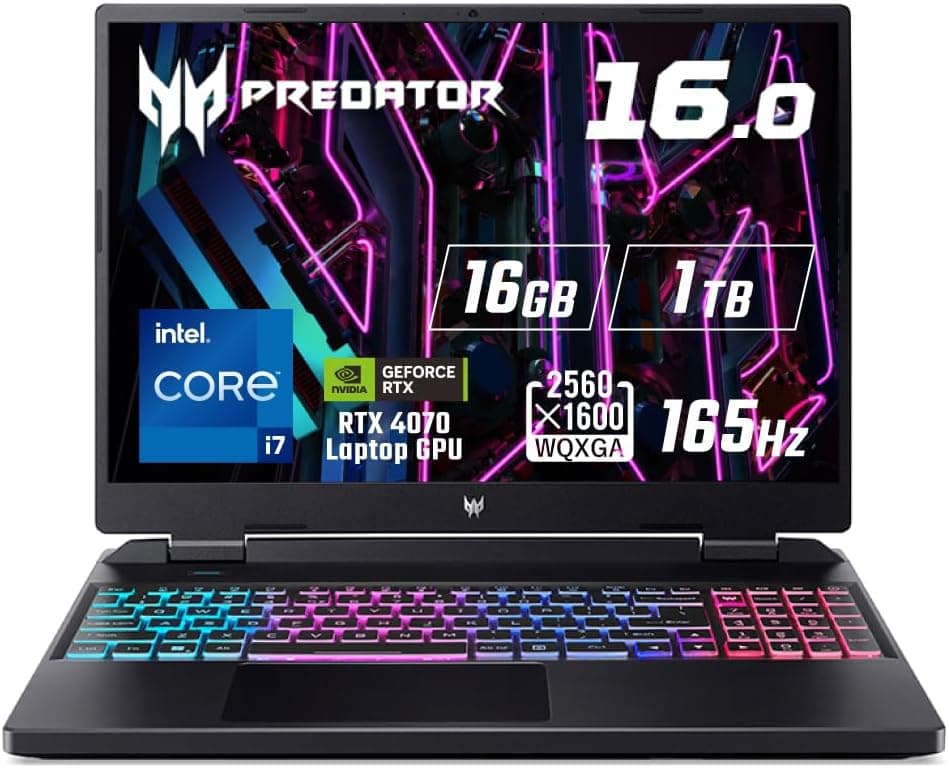
The panel is a 2560x1600 (WQXGA) 16:10 IPS running at 165Hz with a 3ms (OD) response time. It ships with 16GB of DDR5-4800MHz memory, a 1TB SSD, Windows 11 Home, and Wi-Fi 6.
On paper it is a balanced 2023-generation gaming laptop: nothing stands out dramatically, but nothing drags the rest down either.
Reading the Specs
Spec values alone don't tell you how the machine feels. Here is what each item actually means in use.
| Item | Value | What it means in practice |
|---|---|---|
| CPU | Intel Core i7 | Matters most for streaming and encoding; the GPU caps out first in games |
| GPU | RTX 4070 Laptop | AAA titles at WQXGA realistically need settings tuning plus DLSS |
| Memory | 16GB DDR5-4800MHz | Fine for gaming alone; tight when streaming or editing at the same time |
| Storage | 1TB SSD | Roughly 5–8 large titles before it fills up; check upgrade options |
| Resolution | 2560x1600 (WQXGA) | Taller 16:10 canvas helps work; costs GPU headroom in games |
| Refresh rate | 165Hz | Competitive titles benefit; heavy titles won't sustain it |
| Weight | About 2.6kg | Add the AC adapter and you are carrying over 3kg |
The key tension is resolution versus refresh rate. Rendering at 2560x1600 is roughly twice the load of 1920x1080, so 165Hz does not translate into a constant 165fps.
In demanding titles you will lower settings or lean on upscaling to hit high frame rates; in lighter competitive titles the 165Hz panel earns its keep.
RTX 4070 Laptop GPUs are commonly configured with 8GB of VRAM. The supplied specs list neither the VRAM capacity nor the GPU's TGP (power budget), and TGP varies between laptops carrying the same GPU name.
Check the manufacturer's product page for the TGP figure before buying so expectations match reality.
How It Compares
Against other 16-inch gaming laptops, this machine wins on screen area and loses on portability. Recent 14-inch RTX 5060 machines hit around 1.5 kg with 165Hz panels, which makes them the better pick if you actually carry the laptop.
Conversely, the 16-inch WQXGA workspace is a clear advantage for editing timelines and multi-window work.
Within Acer's own range, the Predator Helios 16 (without "Neo") typically sits above this line with a more developed cooling system and chassis. Neo is the entry point to the Predator brand; if acoustics and build quality matter to you, compare both.
Generationally, this is an RTX 40-series machine. As of 2026, RTX 50-series laptops are widely available, so compare it against current-generation machines at the same price.
Being a previous generation is not a flaw by itself, but it weakens the case when the price sits close to newer hardware.
Compatibility Guide
This is a laptop, so expansion works nothing like a desktop. As the supplied compatibility notes state, the CPU and GPU cannot be replaced.
The configuration you buy is the ceiling.
- Memory: DDR5, 16GB as shipped. Some laptop configurations use replaceable SO-DIMM slots, others solder memory to the board. The supplied data only says memory "may be replaceable on some configurations," so verify the slot layout in the manufacturer's spec sheet if you plan to upgrade.
- Storage: 1TB SSD. A free M.2 slot is common but configuration-dependent. Don't assume you can add a drive later without confirming.
- External display: HDMI output is present, so external monitors work. Whether the USB-C port carries video or supports Thunderbolt is not stated in the supplied data — confirm on the product page if you plan to run a dock.
- Networking: Wi-Fi 6 wireless. For competitive online play, a wired connection is still the most reliable choice.
- Power: Gaming laptops reach full performance only on the bundled AC adapter. A generic USB-C PD charger may charge the machine but generally cannot supply enough power to drive the GPU at full load, so plan on carrying the adapter.
Physically, a 16-inch, 2.6 kg chassis also needs clearance for rear and side exhaust.
Shallow desks and keyboard trays block airflow and raise temperatures. Leaving roughly 10cm behind the machine is a sensible baseline.
Product Info
The price was ¥304,800 on Amazon.co.jp as captured on 26 May 2026.
An eBay US listing at $1800.00 was recorded on 10 July 2026.
Prices move frequently and can drop sharply during sales, so always check the current price on the product page — the figures here are a snapshot, not a current quote.
Note that in the supplied data the entry labelled "Amazon US" carries the same yen figure (¥304,800) and links to the Japanese product page. No separate overseas price was actually captured, so you cannot use this data to judge regional price differences.
Reviews on Amazon.co.jp sit at 4.8 out of 5 (about 96% positive) — but from only 6 reviews.
Treat that carefully: six ratings carry almost no statistical weight. A product holding 4.5 across thousands of reviews is not comparable to one at 4.8 across six.
There simply isn't enough data here to judge defect rates or long-term reliability.
It launched in 2023 and carries the standard one-year manufacturer warranty. The box contains the AC adapter and power cable; a mouse, bag, or external storage must be bought separately.
Long sessions on a built-in keyboard get tiring, so budget for an external mouse.
Product Disclosure (Amazon)
- Manufacturer: Acer
- Seller: Amazon.co.jp
- Fulfilled by: Amazon.co.jp
- ASIN: B0C7WK4YBP
- Note: This article covers a manufacturer-made product based on Amazon listing details.
Living With It
As with gaming laptops generally, fan noise rises noticeably under load. Packing hot components into a thin chassis leaves airflow as the only cooling option.
If you play through speakers rather than a headset, or use the machine at night in a shared room, factor this in. Most gaming laptops let you switch performance modes, and stepping down from the highest mode is the practical compromise when you need quiet.
Battery performance matters too. Gaming laptops typically throttle GPU power on battery, so unplugged performance won't match plugged-in performance.
"Playing the latest titles comfortably on battery in a café" is not realistic for this class of machine, this model included.
Best Use Cases
This laptop is an easy recommendation for:
- Desk-primary users who move the machine a few times a year. If you lack space for a desktop and monitor, a 16-inch WQXGA all-in-one solution works well.
- People combining gaming and work. The tall 16:10 panel directly helps editing timelines, documents, and code.
- Anyone wanting more than 1080p who is willing to tune settings. Coming from a 1920x1080 laptop, WQXGA is a genuine step up.
- Buyers comfortable with RTX 40-series hardware. A 2023 machine has mature community knowledge — troubleshooting and tuning advice is easy to find.
It is not a good fit if portability is your main requirement, if quiet operation is a priority, or if battery life drives your decision. Those are structural weaknesses, not things you can configure away.
Things to Check Before Buying
This is the section that matters most.
1. 2.6 kg is "occasionally portable," not "daily portable." With the adapter you cross 3 kg.
14-inch machines with the same 165Hz spec exist near 1.5 kg, and that gap is decisive if you commute.
Don't take "portable" at face value.
2. 16GB is merely adequate in 2026. Fine for gaming alone, but tight when running many browser tabs alongside streaming software.
If you can't confirm the memory is upgradeable, consider a 32GB configuration from the start.
3. There are only 6 reviews. A 4.8 average looks great, but with six ratings, chance dominates.
It tells you nothing about defect rates or long-term durability. Any product with fewer than ten reviews should be read as "not yet evaluated."
4. Weigh the previous-generation status against the price. This is a 2023 RTX 40-series machine.
If the current price sits near newer-generation laptops, the case for choosing it weakens. Compare side by side before committing.
5. Amazon listing details can disagree with the actual product. Registered listing information — manufacturer, model number, spec fields — sometimes contains errors from automated collection or seller input.
In the data behind this article, one price entry is labelled "Amazon US" yet links to the Japanese page with a yen figure. You may hit similar inconsistencies on the same page, so check the product images, title, and spec table yourself before ordering. In particular, verify the exact Core i7 model, the GPU TGP, and the memory slot layout against the manufacturer's official spec sheet rather than the listing alone.
6. Confirm what the USB-C port supports. The supplied data doesn't specify Thunderbolt support, video output, or PD charging.
If your plan depends on a dock or a USB-C monitor, confirm this before buying.
FAQ
Q. Will the latest AAA titles run smoothly at WQXGA on max settings? A.
It depends on the title. The RTX 4070 Laptop GPU is capable at 2560x1600, but heavy ray-traced titles realistically need lowered settings or DLSS.
Don't expect a constant 165fps at max settings.
Q. Can I add memory or storage later? A.
The supplied compatibility notes say memory and storage "may be replaceable on some configurations," so it depends on the exact unit. Check the manufacturer's spec sheet for slot count and availability before buying on that assumption.
CPU and GPU are fixed.
Q. Can it replace a desktop PC? A.
It's a strong option if you want a single machine. But an equivalently priced desktop will be faster and expandable.
The trade is space and portability.
Q. Does it work with external monitors? A.
Yes, via HDMI. USB-C video output isn't documented in the supplied data, so confirm on the product page.
Closed-lid (clamshell) use works, but keep the exhaust vents clear.
Q. Is it good for a student who carries a laptop daily? A.
Honestly, no. At roughly 2.6 kg plus the adapter, a lighter 14-inch gaming laptop will make you happier if you carry it every day.
Q. Is Wi-Fi 6 still enough? A.
For typical home use and online play, yes, for the foreseeable future. That said, wired Ethernet remains the most reliable choice when competitive stability is the priority.