Overview
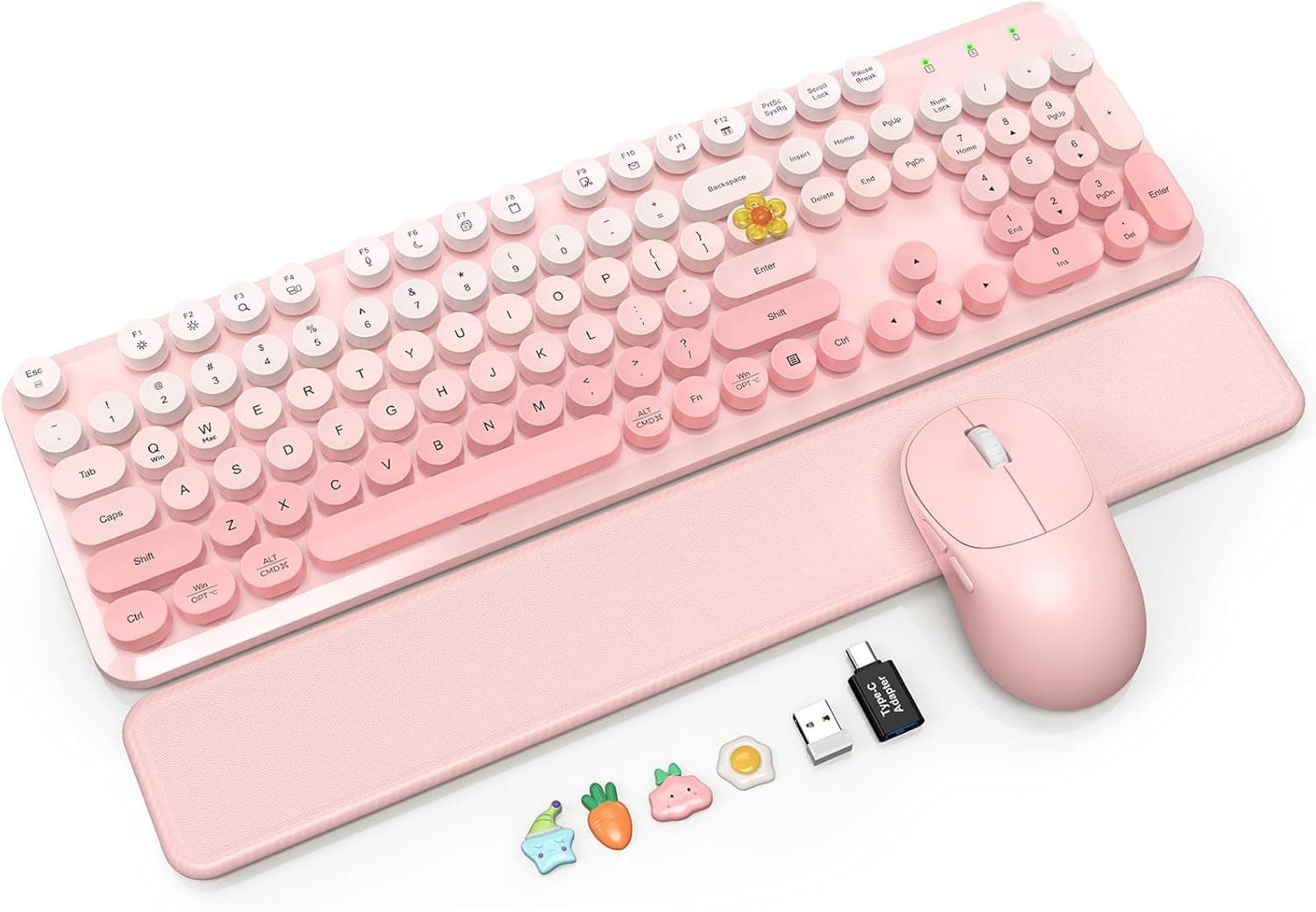
The SABLUTE Wireless Keyboard & Mouse Combo in Brush Pink Ombre pairs retro typewriter-style round keycaps with a detachable magnetic soft-touch wrist rest. To be direct: this is not a performance typing product.
You are buying a coordinated look, a lower wrist angle, and a cable-free desk. On Amazon.co.jp it holds 4.4 out of 5 stars from 1,029 reviews (88% positive, captured 2026-06-01), which is a steady result for a decorative full-size combo.
A single 2.4GHz USB receiver drives both the keyboard and the mouse, so there are no drivers to install and no separate pairing steps.
The mouse offers three DPI stages (800 / 1200 / 1600) plus side buttons — enough for office work and browsing. Mechanically, though, nothing here is exotic.
Compatibility Guide
The combo is Windows-only and connects only through its bundled 2.4GHz receiver.
There is no Bluetooth. That single fact decides whether this product fits you.
| Environment | Expected result | Note |
|---|---|---|
| Windows desktop/laptop with free USB Type-A | Works as intended | Plug in and go |
| Type-C-only laptop | Adapter required | Type-A to Type-C hub |
| iPad / Android tablet / phone | Effectively unusable | No receiver port, no Bluetooth |
| Mac | Listed as unsupported | Some keys may misbehave |
| Consoles (PS5 etc.) | Not guaranteed | Receiver recognition varies |
The practical stumbling block is the USB port itself. You need one free USB Type-A port; thin laptops with only Type-C will need a hub.
Receivers are also sensitive to placement — cursor jumps and dropped keystrokes usually trace back to a receiver buried in a rear-panel port next to a metal chassis or a USB 3.0 connector.
Moving it to a front port or an extension cable, with line of sight to the keyboard, fixes most of these cases.
Also note the power source: the keyboard takes 2x AAA and the mouse takes 1x AA, and neither is included. Buy batteries alongside the combo if you want to use it on arrival.
Auto sleep kicks in after 5 minutes of inactivity, which helps battery life, but it brings the usual side effect: the first keystroke that wakes the device is sometimes swallowed. In a password field that looks like a typo, so get into the habit of tapping once before typing.
Product Info
Key specifications:
| Item | Value |
|---|---|
| Connection | 2.4GHz wireless (USB receiver) |
| Mouse DPI | 800 / 1200 / 1600 |
| Keyboard battery | 2x AAA (not included) |
| Mouse battery | 1x AA (not included) |
| Auto sleep | After 5 minutes idle |
| OS support | Windows only |
Pricing on Amazon.co.jp was ¥15,054 as captured on 2026-06-01 and ¥13,767 as captured on 2026-08-27.
Both figures are point-in-time snapshots and move with sales and coupons, so check the product page for the current price. One of the price records carries an "Amazon US" label, but the link points to the Japanese Amazon store and the currency is yen — don't be misled by the label.
On numbers alone this is not a cheap membrane combo; the same budget buys a standalone wireless mechanical keyboard. What you actually get here is a matched set — keyboard, mouse and wrist rest in the same ombre finish — and a round-keycap look that few competitors offer.
Judge it as a finished desk aesthetic, not as price-per-performance, and your expectations will line up with the product.
The review score of 4.4 across 1,029 ratings (captured 2026-06-01) is high enough to rule out widespread defects or connection failures.
Bear in mind, though, that ratings for style-led peripherals are inflated by satisfaction with the looks, so discount them somewhat as a verdict on typing feel.
What Matters in Daily Use
Round keycaps make key boundaries visually obvious, but a fingertip landing on the rim slips more easily than on a flat sculpted cap. Touch typists notice little; people who look at the keys tend to make more errors for the first few days.
Give it about a week before judging.
The magnetic wrist rest detaches easily, but that also means it slides sideways if you push into it. It is a prop for reducing wrist extension, not a fixed palm rest you can lean your body weight on.
The upside of the magnet is genuine: it comes off for cleaning and frees desk space when unused.
The two-stage tilt legs raise the rear edge in the usual way. Since a bent-back wrist gets tiring over long sessions, start flat (legs down) if you also use the wrist rest — raising both at once often makes fatigue worse, not better.
Best Use Cases
- People coordinating desk colors and textures; matched pink ombre sets covering keyboard, mouse and wrist rest are rare.
- Single-Windows-PC users who never need device switching — a receiver setup is plug-in-and-forget.
- Document, spreadsheet, email and browsing work where quiet operation and looks matter more than raw typing speed; the full-size layout includes a numpad for data entry.
- Anyone who would rather buy one coordinated set than shop for keyboard and mouse separately.
Before You Buy
The lack of Bluetooth is the most commonly overlooked limitation. Sharing the keyboard with a tablet or phone, or switching between a work PC and a personal PC, simply is not possible.
You can move the receiver between machines, but reaching behind a PC each time is not a workflow. If multi-device use is a requirement, buy a Bluetooth model instead.
It is not a gaming set. Consumer combos in this class generally make no promise about polling rate or N-key rollover, so simultaneous WASD + Shift + Space presses may drop inputs.
For competitive play, choose a wired or explicitly low-latency gaming product.
Do not expect mechanical switch feel. This is typewriter-styled, not a typewriter, and the round keycaps suggest a firmer, clickier action than the board actually delivers.
If typing feel is your priority, a mechanical keyboard at the same budget will satisfy you more.
Batteries are sold separately — 2x AAA and 1x AA. Rechargeable NiMH cells pay off over time if you type daily.
Verify the listing details yourself. Amazon product-information fields (manufacturer, model, OS support) sometimes disagree with the physical item because they reflect what the seller registered.
With newer or lesser-known brands, the color name and the keyboard layout (JIS vs. US) are especially prone to vague or wrong entries.
Confirm the finish and layout from the product images and title before ordering — layout mismatches are a classic reason for returns.
FAQ
Q. Does it work with Mac or iPad? A.
The manufacturer lists Windows only. Tablets and phones cannot take the USB receiver and there is no Bluetooth, so they are out.
On a Mac the receiver may connect physically, but some keys may not behave as labeled — not recommended.
Q. Does it occupy two USB ports?
A. No. One bundled receiver serves both devices, using a single USB Type-A port.
Q. Are batteries included?
A. No. Supply 2x AAA for the keyboard and 1x AA for the mouse yourself.
Q. Is waking from sleep slow? A.
Auto sleep triggers after 5 minutes idle. Wake takes roughly a second, but the keystroke that wakes it may not register.
Tap once before typing into a password field.
Q. How quiet is it? A.
Quieter than a mechanical board, but not silent. For shared rooms at night or for calls where typing noise must disappear, look for a product that explicitly advertises silent operation.
Q. Can the wrist rest be used with another keyboard? A.
It attaches magnetically to this keyboard and is not designed as a standalone palm rest, so plan on using it only with this set.
Product Disclosure (Amazon)
- Manufacturer: SABLUTE
- Seller: FK MIKANEX IMPORT
- Fulfilled by: FK MIKANEX IMPORT
- ASIN: B0G4W99L2Y
- Note: This article covers a manufacturer-made product based on Amazon listing details.